

Every property platform now claims an AI. Here's a number worth holding onto while the demos play: when Stanford researchers put more than 200,000 legal questions to general-purpose AI chatbots, the models hallucinated at least 75% of the time on questions about what a court actually ruled. Confident, fluent, wrong — and formatted beautifully.
So the useful question isn't "does this platform have AI." Everything has AI. The sharper questions are three: what can it actually see, what can it actually do, and what happens when it's wrong? This deep-dive answers them for Keya, Tenon10's AI copilot — the plain-English interface to your own ledger, available as Q&A from the free plan and as a full copilot on Pro — and teaches an evaluation framework that works on any platform's AI, Keya included. You'll get the three-kinds-of-answers test, the five questions worth asking on any demo, the honest limits, and a downloadable checklist: ten questions before trusting any AI with your tenancy paperwork. General information, not legal advice — and yes, the advice to verify AI answers applies to this platform's AI too.
10 Questions to Ask Before Trusting Any AI With Your Tenancy Paperwork
The evaluation checklist for any "AI for landlords" — what it can see, what it can do, what happens when it's wrong — plus the verification habits that keep notices, filings, and money movements safe. Works on every platform's AI, Keya included.
Get Free PDF →The Problem With "It Has AI"
The category has had its AI moment: listing writers, leasing copilots that answer calls and book tours, screening scorers, chat layers on every dashboard, and "saves hours a week" claims circulating as marketing. None of it tells you whether the thing is safe around your money and your legal documents. The research on general-purpose chatbots is sobering precisely because the failures are fluent: large language models generate text that sounds right rather than text that is right. Beyond the 75% figure, the documented casualties include hallucinated leases missing required disclosures, citations to court decisions that don't exist, and a municipal chatbot that handed out advice that was both incorrect and unlawful.
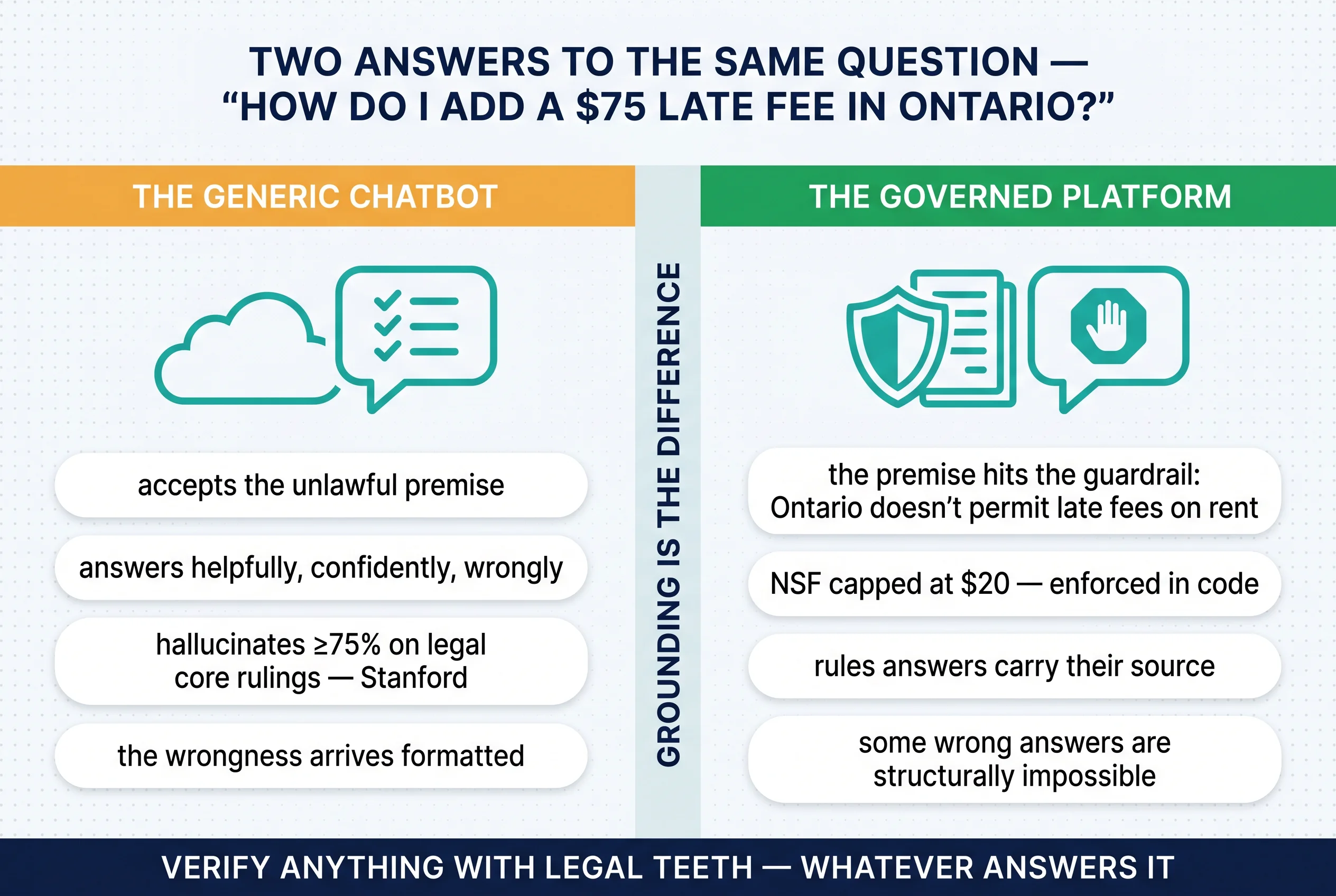
The trap with the sharpest teeth is sycophancy: models tend to accept the false premise embedded in your question and build helpfully on top of it. Picture the illustrative case — a new Ontario landlord asks a generic chatbot, "how do I add a $75 late fee for my tenant?" A confident, structured, step-by-step answer may come back, and at no point flag the real issue: Ontario doesn't permit late fees on rent at all. The wrongness arrives formatted. Which is why the useful reframe isn't "AI or no AI" — it's which kind of answer you're getting.
Three Kinds of AI Answers — and Where Keya's Live
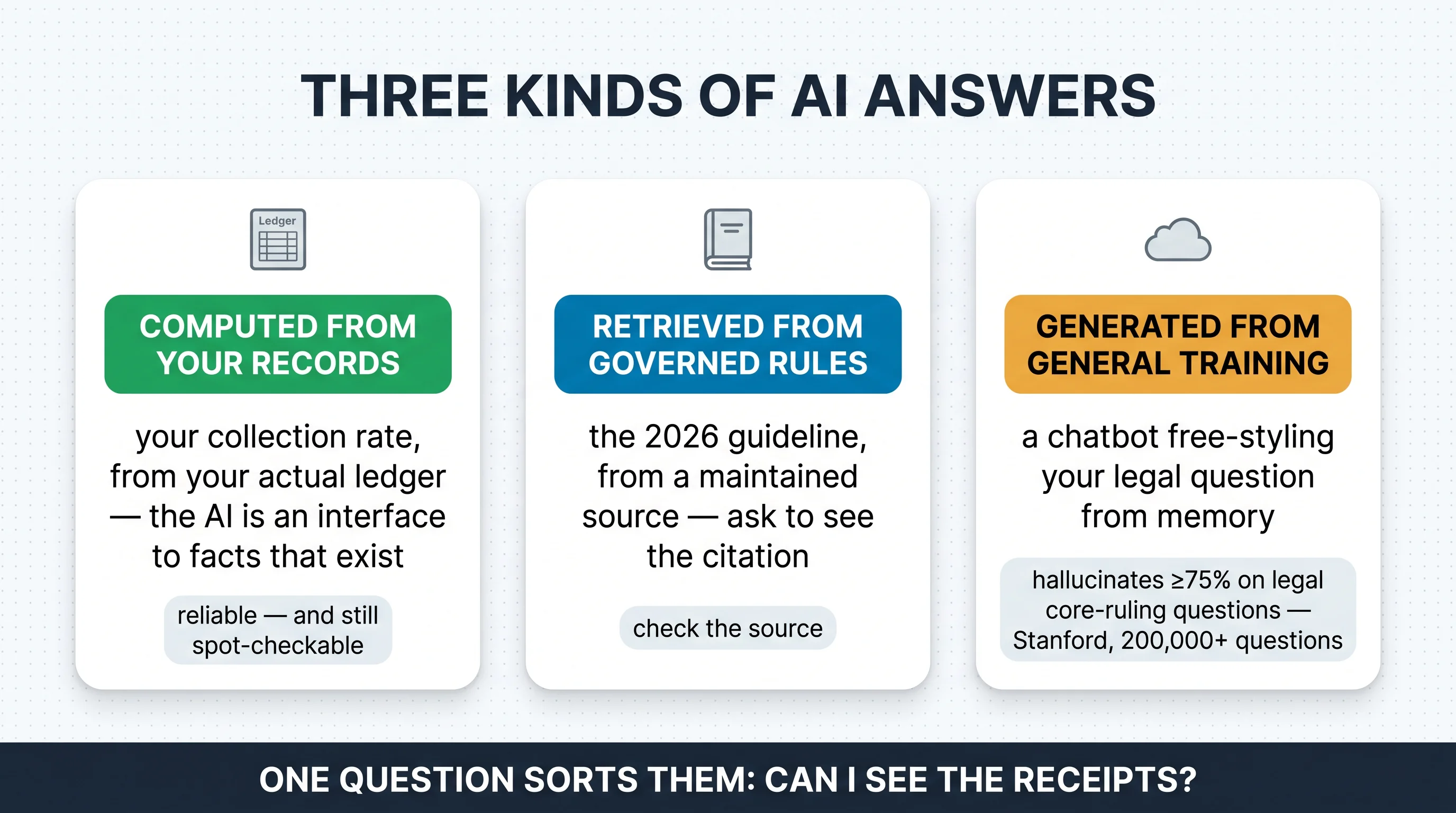
Every answer an AI gives you belongs to one of three kinds. Computed from your records: "what's my collection rate?" answered from your actual ledger — deterministic data; the AI is an interface to facts that exist. Retrieved from governed rules: "what's the 2026 guideline?" answered from a maintained, verifiable source (it's 2.1%, and here's the full guide). Generated from general training: a chatbot free-styling your legal question from memory — the 75% zone. One question sorts them all: which kind is this answer, and can I see the receipts?
Now read Keya's public evidence through that lens. The demo on tenon10.com's own homepage is an accounting query: "What's my collection rate this month?" — and the answer comes back "$8,400 collected of $9,600 due (87.5%). Three payments still pending..." Specific dollars, a computed rate, a pending count: a type-one answer on its face, drawn from the user's own books. And the substrate underneath is exactly what our accounting module deep-dive and owner sub-accounts guide walked through: a ledger that builds itself at collection, per-unit expense history, Ontario's rules enforced in code — unlawful charges refused, NSF capped at $20, the guideline validated inside N1 flows — and 20+ LTB forms as structured workflows. That's the pattern the public evidence shows: the interesting answers are computed or governed, not free-styled. It is not a guarantee that any AI never errs — no honest vendor would claim that, and this article won't either.

Where Keya lives by plan: Q&A on the free tier and Essentials; the Full Copilot on Pro. Two illustrative moments show why the grounding matters. The 11 pm question: "which units haven't paid yet?" — answered from the ledger in seconds, versus the banking-app-and-spreadsheet expedition that ends with an apologetic text to a tenant who paid on the first. And the unlawful-premise question: that same $75 late-fee query, asked inside a rules-governed platform, runs into the guardrail instead of a helpful wrong answer — some mistakes become structurally impossible rather than merely discouraged.

The Honest Limits — and the Five Demo Questions
Here's what's public and what isn't. The pricing table draws the Q&A-versus-Full-Copilot line by plan, but doesn't publicly itemize which capabilities sit on each side of it. Whether voice interaction is live isn't confirmed either — the company's public hiring materials describe voice-agent architecture, which is a signal about direction, not a shipped feature. And this guide won't describe screens it hasn't seen. For scale context, Tenon10 publicly describes itself as an AI-native platform with paying customers managing 180+ units across Ontario — the company's own statements, current as of writing. What no copilot replaces, on any platform: the LTB's own forms discipline, your paralegal or lawyer on contested matters, and your CPA at filing time. Grounding reduces errors; it doesn't repeal verification — even well-grounded tools can misread a document or overstate its scope.
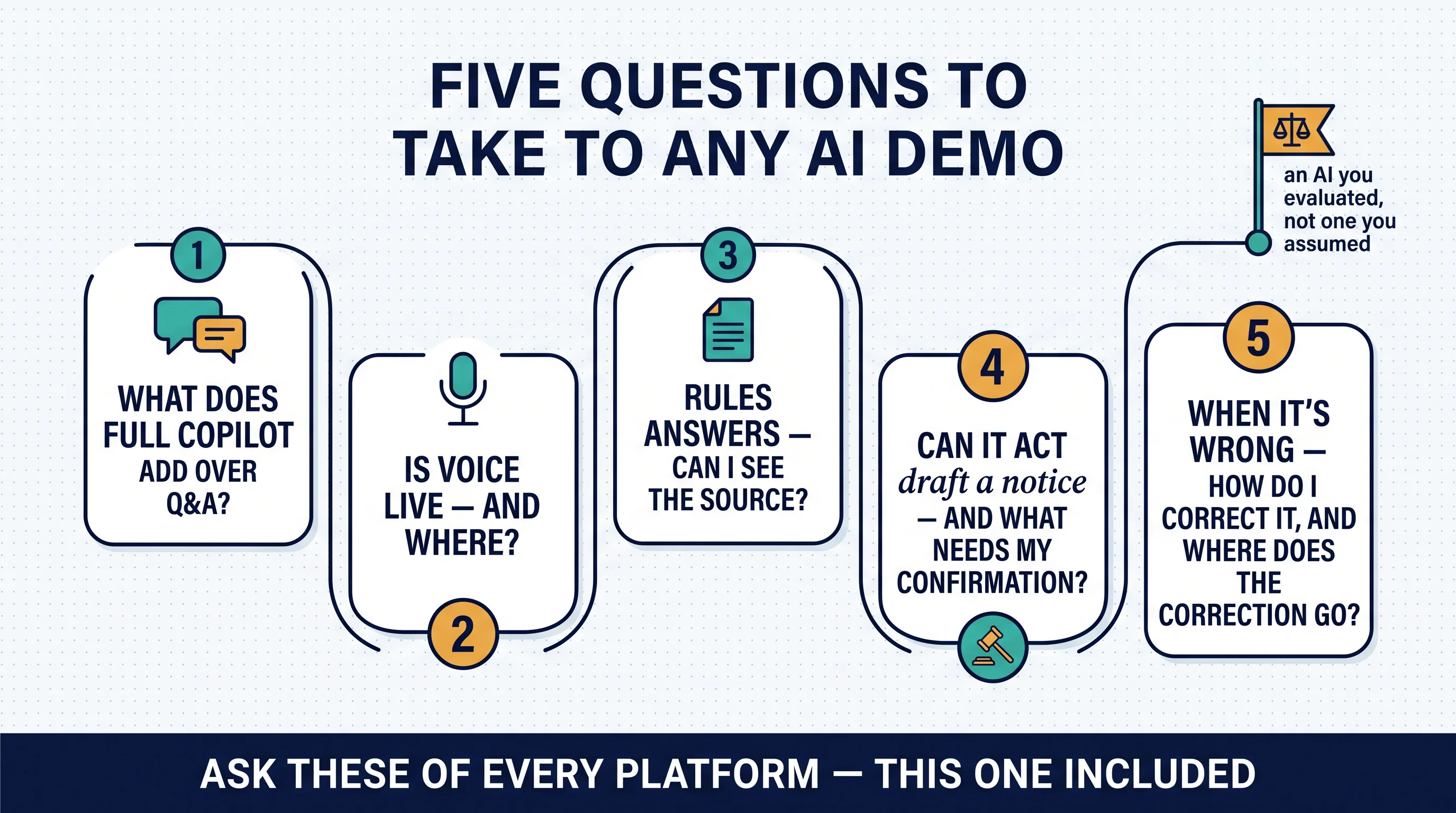
So take these five questions to any AI demo — Tenon10's included:
- What exactly does Full Copilot add over Q&A? Itemized, not implied.
- Is voice interaction live — and where?
- When it answers a rules question, can I see the source?
- Can it take actions — draft a notice, post an entry — and what requires my confirmation?
- When it's wrong, how do I correct it — and where does the correction go?
On cost: Keya's Q&A layer starts at zero — the free plan ($0, up to 3 units) includes it. Essentials ($9.99/month, up to 10 units) carries Keya AI Q&A in the fuller operating stack, and the Full Copilot arrives with Pro ($49/month, up to 25 units, 30-day trial) alongside the complete bookkeeping, tax-filing prep, and analytics — the public comparison table also notes Pro includes "T776 Tax Filing — first full year." Tenants never pay. Prices and inclusions change — see tenon10.com/pricing for current rates.
The Verification Habit: Using Any Copilot Like a Professional
Treat outputs by risk tier. A computed number you can click into is low-risk — still spot-check the detail behind it now and then. A rules answer gets its cited source opened. Anything entering a legal document stays a draft until verified against the original — for Ontario notices, that means the LTB's own forms, which is exactly the discipline behind our forms hub. Keep the human in the loop where it counts — notices, filings, money movements; the industry's own deployment norms call for human review on high-stakes outputs, and that norm protects you. Phrase your questions neutrally — "what are the rules on late-payment charges in Ontario?" beats "how do I add a late fee?" — the sycophancy lesson, inverted. And feed the machine good books: an AI interface to your ledger is only as good as the ledger, which is the quiet argument for books that build themselves at collection, and for the broader automation stack done in the right order. The illustrative payoff: the landlord who treats every AI draft as a draft is the one who catches the single edge case that mattered — before it left the building.
Practical Takeaways
- Stop asking "does it have AI" — ask what it can SEE, what it can DO, and what happens when it's WRONG.
- Sort every AI answer into computed / retrieved / generated — and demand receipts for the first two.
- Never take legal mechanics from a generic chatbot — the 75% zone is real, and it agrees with your false premises.
- Keep notices, filings, and money movements human-confirmed.
- Verify anything headed into a legal document against the original source.
- Make your books AI-ready by making them self-building — the interface is only as good as the ledger.
- Take the five demo questions to any platform tour — this one included.
Quick win: run the grade-before-you-trust test tonight. Long-term: the verification habit compounds into exactly the audit trail our CRA-audit guide says you want anyway.
10 Questions to Ask Before Trusting Any AI With Your Tenancy Paperwork
The evaluation checklist for any "AI for landlords" — what it can see, what it can do, what happens when it's wrong — plus the verification habits that keep notices, filings, and money movements safe. Works on every platform's AI, Keya included.
Get Free PDF →Grounding, Scope, Correction
Every platform has an AI now; those three words are where the differences live. Keya's public shape is the right shape — a named copilot whose demo answer is computed from the user's own ledger, sitting on a platform where the books build themselves and Ontario's rules are enforced in code, offered as Q&A from the free tier and a full copilot on Pro. Hold it to the framework anyway: ask the five questions, demand the receipts, keep the human in the loop on anything with legal or financial teeth. That's not distrust — it's exactly how professionals use powerful tools. General information, not legal advice; AI capabilities and pricing change — verify at tenon10.com/pricing, and keep your paralegal and CPA in the loop where it counts.
Ask Your Own Books a Question
Keya Q&A starts on the free plan — grounded in a ledger that builds itself at collection, with Ontario's rules enforced in code underneath.
Q&A from $0 • Full Copilot on Pro • Tenants always free
Related Resources
The sibling deep-dives: The Accounting Module — the ledger Keya's demo answer is computed from · Owner Sub-Accounts — the PM layer, and the trust discipline underneath.
The rules Keya stands on: Ontario Rent Increases 2026: The Complete N1 Guide (the 2.1% guideline at source) · 5 Things Your Landlord CAN'T Do in Ontario · the rent increase calculator and Ontario LTB forms hub.
The operating stack: Automation for Rental Management · Property Management Software: What to Look For in 2026 · CRA Audits of Rental Income — the audit trail the verification habit builds.
Frequently Asked Questions
What is Keya on Tenon10?
Keya is Tenon10's named AI copilot — the conversational layer over the platform's records and rules. The public demo on tenon10.com shows the shape of it: ask "What's my collection rate this month?" and the answer comes back computed from your own ledger — "$8,400 collected of $9,600 due (87.5%). Three payments still pending..." — real dollars, a real rate, a pending count. Keya is available as Q&A starting on the free plan and as a full copilot on Pro, sitting on top of the platform's self-building books, per-unit financial history, and Ontario compliance rules enforced in code. What distinguishes that design from a generic chatbot is grounding: the interesting answers are computed from your records or drawn from governed rules rather than generated from a model's general memory. Plan inclusions change — see tenon10.com/pricing for current details.
Can I trust AI with my tenancy paperwork?
Trust it the way professionals trust powerful tools: by category, with verification. Research on general-purpose chatbots found they hallucinate at least 75% of the time on questions about what courts actually ruled, and they tend to accept false premises embedded in your question — ask how to charge an unlawful fee and many will helpfully explain how. So sort AI answers into three kinds: computed from your records (a collection rate from your actual ledger — reliable, still spot-checkable), retrieved from governed rules (check the cited source), and generated from general training (never the basis for a legal document). Anything headed into a notice, a filing, or a money movement stays a draft until a human — you, and where it matters your paralegal or lawyer — has verified it against the original. Grounded platform AIs narrow the risk dramatically; they don't repeal the verification habit.
What's the difference between Keya Q&A and the Full Copilot?
The public pricing table draws the line by plan: Keya AI Q&A is included from the free tier and on Essentials ($9.99/month, up to 10 units), while the Full Copilot lives on Pro ($49/month, up to 25 units, 30-day trial) alongside the complete bookkeeping, tax-filing prep, and analytics stack. What the table doesn't publicly itemize is exactly which capabilities sit on each side of that line — which is why it leads our list of demo questions: ask what Full Copilot adds over Q&A, whether Keya can take actions (drafting a notice, posting an entry) versus only answering, and what requires your confirmation. Honest guidance: confirm the boundary on a tour or with sales rather than assuming it, and check tenon10.com/pricing for current plan inclusions, because these evolve.
Does Keya give legal advice?
No — and no platform AI should be treated as if it does. What a well-grounded copilot can responsibly do is answer factual questions from your records ("which units haven't paid?"), surface governed rules ("Ontario's 2026 guideline is 2.1%"), and operate inside compliance guardrails — on Tenon10, the platform itself refuses unlawful charges like late fees on rent and caps NSF charges at $20 in Ontario, so some wrong answers are structurally prevented rather than merely discouraged. But applying rules to your contested situation — a disputed N12, an LTB hearing strategy, a capital-vs-current tax judgment — is work for a licensed paralegal, lawyer, or CPA. The professional norm applies to every AI, Keya included: informational answers, human verification on anything with legal teeth, and the original source checked before a document leaves your hands.
How much does Keya cost?
Keya's Q&A layer starts at zero: the free plan ($0, up to 3 units) includes it, so you can ask questions of your own records from day one. Essentials ($9.99/month, up to 10 units) carries Keya AI Q&A within the fuller operating stack, and the Full Copilot comes with Pro ($49/month, up to 25 units, with a 30-day free trial), alongside bookkeeping, tax-filing prep, and analytics & reports — the public comparison table also notes Pro includes "T776 Tax Filing — first full year." Tenants never pay on any plan. As always with plan-level details: prices and inclusions change — see tenon10.com/pricing for current rates, and ask sales where the Q&A/Full-Copilot line sits today.
This article describes Tenon10 platform capabilities and AI-reliability research context as of July 13, 2026 and provides general information, not legal, tax, or professional advice. AI research figures reflect published studies of general-purpose chatbots; individual tools vary and change quickly. Platform features, plan inclusions, and pricing change — see tenon10.com/pricing for current rates, and confirm Keya specifics (including the Q&A/Full-Copilot boundary and voice availability) with the Tenon10 team. Verify legal documents against official sources and consult licensed professionals for your situation.


