

This is the closest price matchup in our comparison series, and it's genuinely good news for small landlords: TenantCloud has spent a decade proving that the budget tier deserves real software — unlimited units from $15–$17 USD a month, a devoted small-landlord following, and a G2 Winter 2026 award shelf (Leader, High Performer, Highest User Adoption) to show for it. Against that, Tenon10's Essentials runs $9.99 CAD for up to ten units, underneath a real $0 tier.
No sales floors like our AppFolio comparison, no scale mismatch like Buildium, no fee-layer ambush at the entry point like the assembled bill in our DoorLoop page. Which means, for once, the decision runs on structure instead of scale — three questions, three honest answers, and a comparison you can run yourself for free on both sides.
The Switcher's Checklist: Moving Your Canadian Rentals to New Software
The 18-point sequence for changing property management software without losing a record, a payment, or a rent cycle — the fit test to run before any demo, the exports to secure before you cancel anything, the parallel month that catches every mapping error, and the clean cutover that keeps CRA-ready archives. Works whichever platform you're leaving and whichever you're joining.
Get Free PDF →The closest stickers in the series
Choose TenantCloud if you want unlimited units at a budget price — no caps anywhere, the exact opposite of the enterprise minimums earlier in this series — plus listing syndication built in, broad basics that genuinely work (payments by ACH and card, screening, maintenance, e-signatures, tax reports), and a platform whose reviewer base is 99.2% small-business: the stars, 4.4 across 262 G2 reviews, actually describe your use case — and its G2 Winter 2026 shelf (Leader, High Performer, Highest User Adoption) was earned in that same segment, which makes the awards unusually informative rather than merely decorative. Choose Tenon10 if you want your free to be a product rather than a countdown, your province's forms inside the software, and a flat CAD bill with tenants free on every tier.
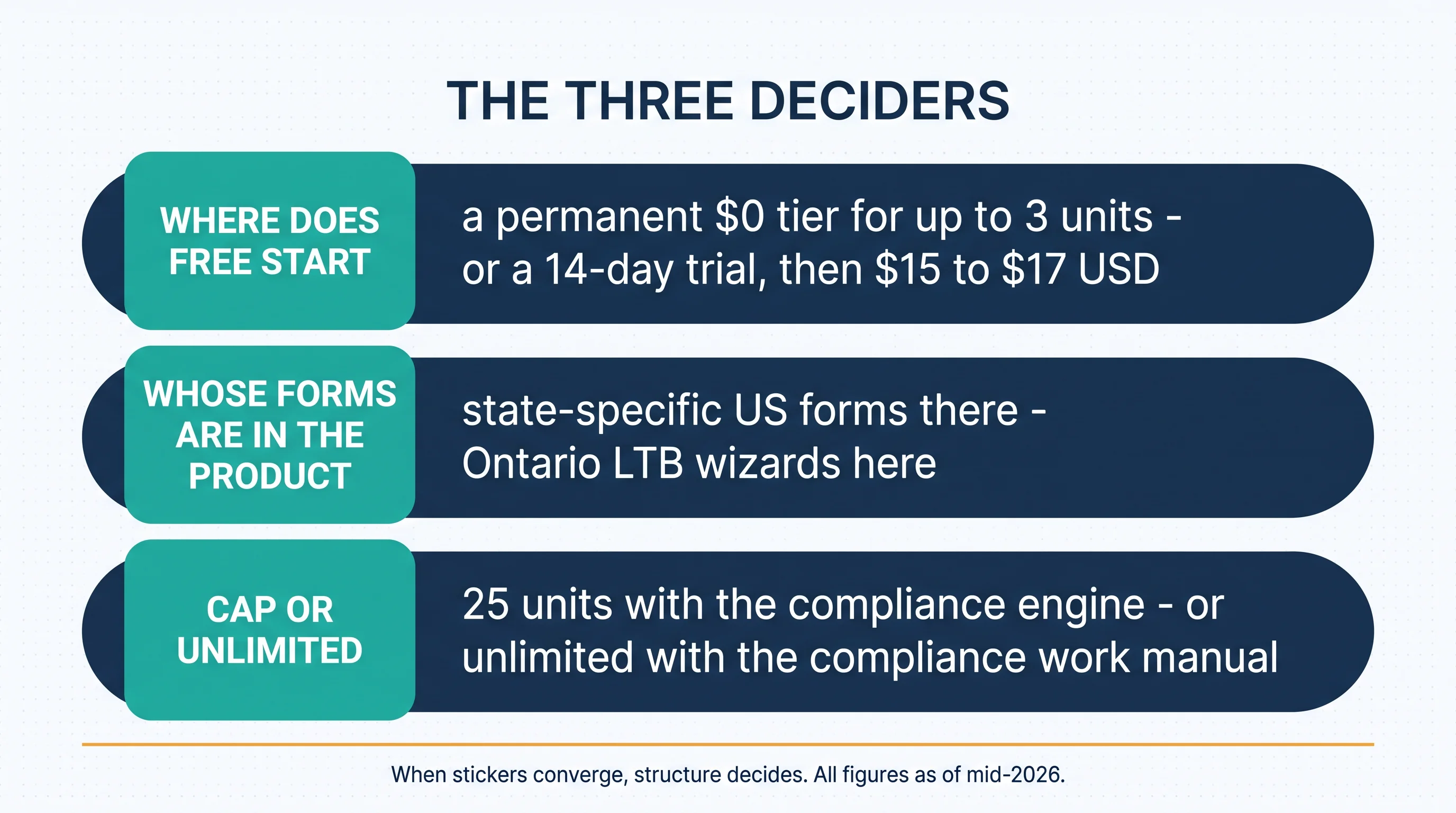
Why close stickers change the method: when price can't decide, structure does — and the three structural splits between these tools are cleaner than any feature-count table. A note on why this matchup exists at all: the budget tier used to mean abandoned software, and TenantCloud is a large part of why it doesn't anymore — a decade of proving that $15 landlords deserve maintained, capable tools pulled the whole category's floor up, ours included. Competing at this tier means competing against a platform that made the tier respectable, which is why this page's concessions are easy to write. One drift note before the numbers, printed once: TenantCloud's plan structure has moved across sources recently — three or four tiers depending on where you read, with entry listed at $15 by their own blog and Capterra and $17 by G2 — so this page uses ranges and their pricing page is the final word.
The three deciders
1. Where does your free start? At one to three units, Tenon10's $0 tier is the whole product, indefinitely — tenants free, no card, no clock. TenantCloud's path starts at $15–$17 USD after a 14-day trial; Capterra and TenantCloud's own materials are clear that there's no free version. A trial is a countdown; a tier is a product.
2. Whose forms are in the product? Name the notices you actually serve, then check whose software contains them. Section four runs this one in full — with TenantCloud's own feature list, generously read, as the star witness.
3. Cap or unlimited? Under 25 units and holding, our cap never binds and never will. Growing past 25 on a budget, their unlimited is the cheapest willing answer this entire series has produced — with the compliance work staying manual as the standing trade.
For landlords: Answer the three deciders in order — the free line decides for starters, the forms decide for Ontario operators, the cap decides for growers. Most readers are done after the first question that applies to them, which is what good structure is for.
Where free starts
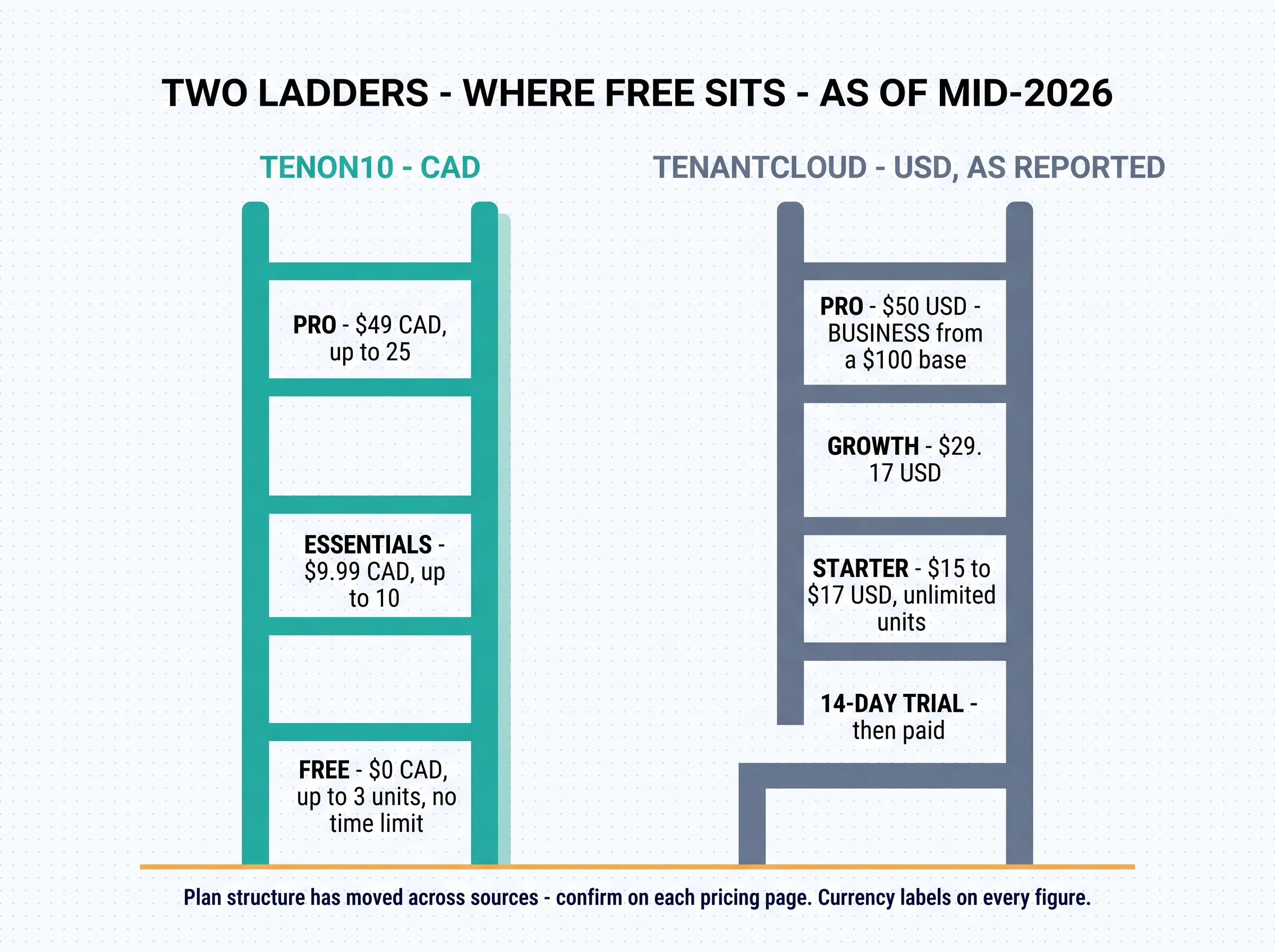
Draw the line precisely, because at the smallest portfolio sizes it's the whole comparison. Tenon10's ladder (all CAD, published): the bottom rung sits at $0 — up to 3 units, tenants free, no card required, no time limit — with Essentials at $9.99 for up to ten and Pro at $49 for up to twenty-five. TenantCloud's ladder (all USD, as reported mid-2026): a 14-day free trial, then Starter at $15–$17, Growth at $29.17, Pro at $50, and Business from a $100 base per their current pricing page — with unlimited units the whole way up, which is the ladder's genuine and considerable virtue. Annual billing has historically saved about 20%.
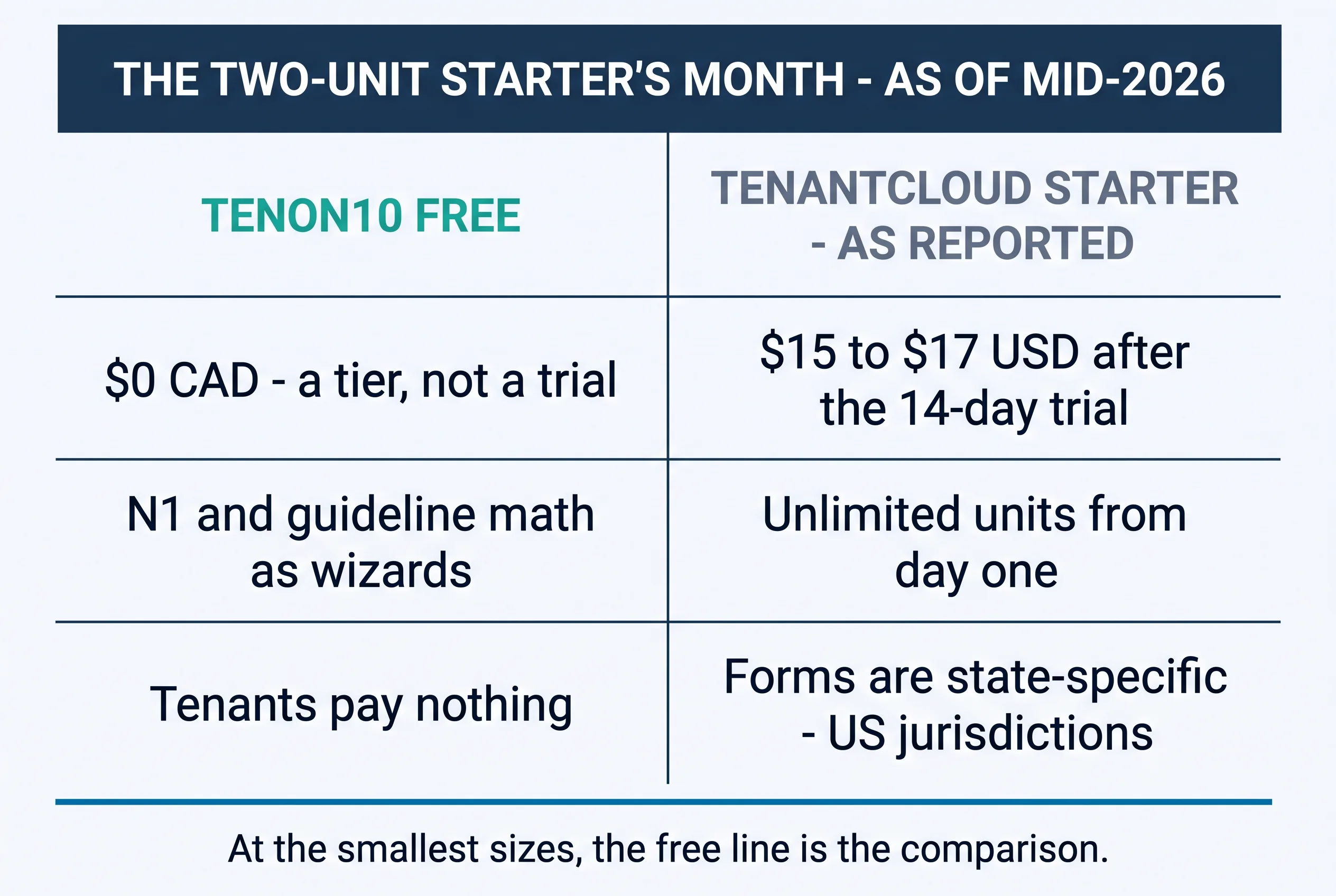
The starter math, worked: a two-unit Toronto landlord pays $0 here — with the N1 as a wizard and the guideline computed — and $15–$17 USD a month there, plus whatever the exchange rate adds, with the N1 as a search result. That's not a knock on their product; it's what a home market means. But at one to three units, the free line decides before a single feature gets compared.
It's worth being precise about why the free line matters beyond the dollars, because $15 a month is not a hardship for most landlords. The real cost of a paid entry rung is decisional: it turns "start keeping proper records today" into "decide whether this is worth paying for first," and small landlords defer that decision for years — usually until the first dispute makes the missing records expensive. A permanent $0 tier removes the decision entirely: the two-unit landlord starts the system of record the week they get the keys, and upgrades if and when the portfolio does. The free line isn't a discount; it's when your paper trail begins.
And the fair flip, in the same breath: at forty units, their ladder still reads $15–$50 USD and ours has ended at twenty-five. The cap section below owns that plainly — this page doesn't get to draw the free line and skip the ceiling.
Whose forms are in the product
Here's the part of this comparison where TenantCloud's own feature list does the explaining. Its Growth tier lists "Landlord Forms (State-specific)" as a feature — alongside 1099 tax forms. Read that generously, because it deserves it: it's the plainest evidence in this entire series that at the small end of the market, form-specificity IS the product. A platform that ships one state's lease and another state's notices knows exactly why a generic template isn't enough — that jurisdiction is not a detail, it's the job. TenantCloud understood that years ago and built it. For its home market.
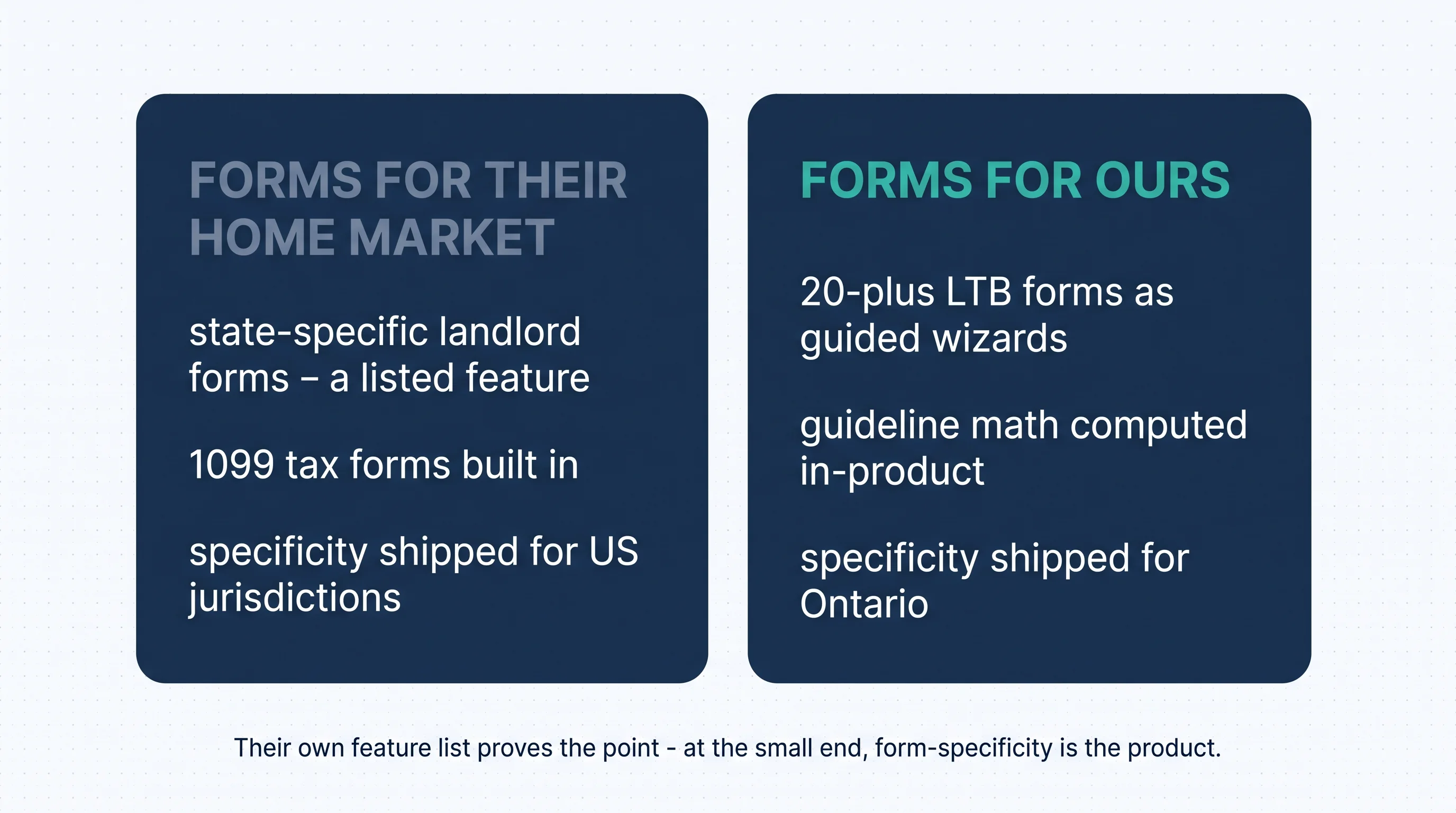
Apply the same logic where our readers actually landlord, and the specificity is provincial: the N4, the N1 and its guideline (2.1% for 2026, 1.9% for 2027 per our rent-increase guides), the standard lease, deposit interest. On TenantCloud, those live in the blank-PDF layer of a landlord's evening. On Tenon10 they're 20-plus LTB wizards with the math computed. The whole contrast in one clean sentence: state-specific forms are the right idea in the wrong jurisdiction for an Ontario landlord.
Cap versus unlimited — and the other trades, plainly
Their win first, because it's real: unlimited units on every plan is genuine generosity at the budget tier. For the 26-plus-door Canadian operator on a tight budget — the reader this series keeps meeting in the gap between products — TenantCloud is the cheapest willing option these nine comparisons will produce, and our 25-unit Pro cap takes us off that list, plainly. The trade rides along at portfolio scale: every N-form, every guideline calculation, every provincial rule, manually, unit after unit — labour that belongs in the comparison right beside the subscription line, because at thirty doors it outgrows the subscription.
Their other real edges, receipts attached: listing syndication built in — we have none, as our liv.rent comparison says plainly; QuickBooks Online sync on their Pro tier (check the gate before assuming it downmarket); a decade of budget-tier iteration; and the most reader-relevant review base in this series — 99.2% small-business means both halves of the reviews describe your situation: the 4.4 stars, and the texture, where reviewers note navigation friction, tedious integrations, and limited online payment options. Read both halves; they're both about you. That's rarer than it sounds: on enterprise platforms, small landlords read reviews written by 200-door operators and wonder why the complaints don't match their life. Here, the reviewer writing about navigation friction manages six units, like you — which makes their praise more credible and their friction more predictive in the same breath.

Our edges, same standard: the $0 tier that is the product; flat CAD with no fee layer and no meters; tenants free on every tier; Keya, the built-in AI assistant, on every tier including Free; and the compliance engine — the wizards, the computed guideline, the encoded deposit and NSF rules — that turns the Tuesday work into fields instead of evenings.
For property managers: Under 25 Canadian doors on a budget, the three deciders apply to you exactly as written. Past 25 on a budget, their unlimited path is the honest answer in this series — and the professional move is to price the manual-compliance hours per door into the comparison, because at portfolio scale that line item quietly becomes the biggest number on the page.
Run both — and how to switch
For the third time in this series, the comparison is empirical: TenantCloud's 14-day trial and Tenon10's permanent free tier both run without a card. One unit in each, the same three tasks on the same day — log a maintenance request, generate a rent receipt, draft the notice you most recently served — and note, as day 14 approaches, the difference between a trial ending and a tier continuing. That difference is this page's first decider, experienced instead of read.
Run the forms task with special attention, because it's where the two platforms stop being comparable: draft the notice you most recently served in each system. In one, you'll find your province's form as a guided wizard with the math done; in the other, you'll find capable generic tooling and a gap shaped exactly like the RTA. Ten minutes on that single task teaches more than every table on this page.
Switching in either direction: the checklist above carries the standard sequence. Two TenantCloud-specific notes: start the 14-day window when you have a real week to test, not a busy one — the countdown doesn't pause for turnovers; and confirm which tier actually holds the features you tested, because forms and QuickBooks gate above Starter.
One worked example of the three-year model, because it changes answers: a landlord at eight units today, adding two a year, is at fourteen in year three — inside both ladders, where the free-line and forms deciders rule and the CAD flat bill stays smallest. The same landlord adding six a year is at twenty-six — past our cap, into their unlimited, with the compliance hours now the number to price. Same landlord, same tools, different trajectories, different answers: that's why the model runs on year three, not on today. The year ahead, one beat: the free line is becoming the small-landlord battleground across the category, and provincial depth stays the Canadian differentiator — two trends that make this page's three deciders more decisive over time, not less.
Your half of the test is free forever, not for 14 days: up to 3 units, no card, tenants free, the N1 as a wizard — five minutes to set up, and no countdown anywhere. Create a free account or see current plans.
The Switcher's Checklist: Moving Your Canadian Rentals to New Software
The 18-point sequence for changing property management software without losing a record, a payment, or a rent cycle — the fit test to run before any demo, the exports to secure before you cancel anything, the parallel month that catches every mapping error, and the clean cutover that keeps CRA-ready archives. Works whichever platform you're leaving and whichever you're joining.
Get Free PDF →Key takeaways
- Closest stickers in the series — so structure decides: the free line, the forms, the cap.
- A trial is a countdown; a tier is a product: $0 for up to 3 units here, $15–$17 USD after day 14 there — at the smallest sizes, that's the whole comparison.
- Their own "state-specific forms" feature proves the point: form-specificity is the product at the small end — Ontario's version is the N4 and the guideline, and it ships here.
- Unlimited units is their honest win — the cheapest willing option for 26-plus doors this series will produce, with the compliance labour as the standing trade.
- Read their reviews, both halves — a 99.2% small-business base makes the stars and the complaints unusually relevant to you.
- Run both free this week, and model three years at your real unit count in one currency — you're buying for year three.
Count your units, name your forms, check where your free starts
That's the closest comparison this series runs, and it ends the way close comparisons should: with respect on both sides and a clean way to decide. TenantCloud earned its place at the budget tier — unlimited units, broad basics, and a decade of small landlords vouching for it — and if you're growing past twenty-five doors on a budget, it's the most willing partner these nine pages will offer you. Tenon10 drew its lines differently on purpose: free that starts at the ground and never expires, a flat CAD bill with nothing metered, tenants who never pay, and Ontario's forms as the product rather than a PDF folder. Three questions sort every reader — where does your free start, whose forms are in the product, and does your trajectory need a ceiling removed or a province encoded. Count your units, name your forms, and check where your free starts — the answer is usually waiting in the first question that applies to you.
Free that starts at the ground — and never expires
A real $0 tier for up to 3 units, flat CAD pricing with no meters above it, tenants free forever, and Ontario's LTB forms as guided wizards. No card, no countdown, no day 15.
Free for up to 3 units • Tenants always free • See current plans
Related resources
- Property Management Software: What to Look For — the full-market evaluation framework.
- Tenon10 vs DoorLoop — the assembled-bill method, one price bracket up.
- Tenon10 vs liv.rent — the marketplace category, and the stack that fills what neither budget tool does.
- The Ontario Standard Lease — the form specificity this page is about, explained.
Frequently asked questions
Does TenantCloud have a free plan?
No — per Capterra and TenantCloud's own materials, there's a 14-day free trial but no free version; paid plans start at $15–$17 USD per month (their blog and Capterra list $15, G2 lists $17 — confirm on their pricing page). Tenon10's Free tier is a permanent $0 product for up to 3 units, with tenants free on every tier.
Is TenantCloud good for Canadian landlords?
It's a genuinely liked budget platform — unlimited units, broad basics, and a 99.2% small-business reviewer base — built for the US market: its listed features include state-specific landlord forms and 1099 tax forms. Canadian provincial compliance — LTB forms, Ontario guideline math — isn't part of the product, and for Ontario landlords that's usually the deciding line.
How much does TenantCloud cost?
As of mid-2026: entry at $15–$17 USD/month, Growth at $29.17, Pro at $50, and Business from a $100 base per their current pricing page — with the plan structure having moved across sources recently, so confirm current tiers directly. All plans include unlimited units, and annual billing has historically saved about 20%.
Which is better for a landlord with more than 25 units?
On a budget, TenantCloud — plainly. Its unlimited units make it the cheapest willing option in this series past our Pro tier's 25-unit cap. Price the trade honestly: every provincial form and guideline calculation stays manual at portfolio scale, and that labour belongs in the comparison beside the subscription line.
Can I try both before deciding?
Yes — TenantCloud's 14-day trial and Tenon10's permanent free tier both run without a card. Set up one unit in each, run the same three tasks side by side, and note the difference between a trial ending and a tier continuing — that difference is the first decider, experienced.


