

Here's a comparison between twins of a different kind. Both of these tools hand a 1-to-3-unit landlord a genuinely free plan — not a trial with a countdown, a product with no clock. Landlord Studio's GO tier covers landlords managing one to three units at $0, per its own pricing page; Tenon10's Free tier covers up to three at $0, tenants free on every tier. The free line that decided our TenantCloud comparison is a tie here — and the tie is what makes this page useful, because it forces the real question forward.
Landlord Studio pairs its free tier with the deepest DIY bookkeeping stack at this end of the market: live bank feeds, receipt scanning, smart rules that file your transactions into tax-ready categories. Tenon10 pairs its free tier with a compliance engine: Ontario's forms as wizards, the guideline math done. Same generous opening move, different products riding along. So the honest question isn't which free is better — it's which question your rental admin is actually asking: books, or forms?
The Switcher's Checklist: Moving Your Canadian Rentals to New Software
The 18-point sequence for changing property management software without losing a record, a payment, or a rent cycle — the fit test to run before any demo, the exports to secure before you cancel anything, the parallel month that catches every mapping error, and the clean cutover that keeps CRA-ready archives. Works whichever platform you're leaving and whichever you're joining.
Get Free PDF →The free-tier twins
Choose Landlord Studio if your admin is led by your books — acquisition-minded, refinance-driven, spreadsheet-native. Its stack is built for exactly that: live bank feeds pulling transactions automatically, receipt scanning that turns photos into records, smart rules filing everything into tax-ready categories, and export-ready P&L and cash-flow reports for Xero and QuickBooks. Add listing syndication to Zillow, Zumper, and Realtor.com, TransUnion screening, guided onboarding with live chat, and transparent per-unit pricing with no setup fees — an ethics overlap this series keeps finding at the honest end of the market — and its claimed 80,000-plus landlords make sense.
Choose Tenon10 if your admin is led by your forms — tenancies, notices, and the paper trail that defends them. The compliance engine rides along free from the first unit: 20-plus LTB forms as guided wizards, the rent-increase guideline computed, deposit and NSF rules encoded, per-unit records with maintenance and message history.
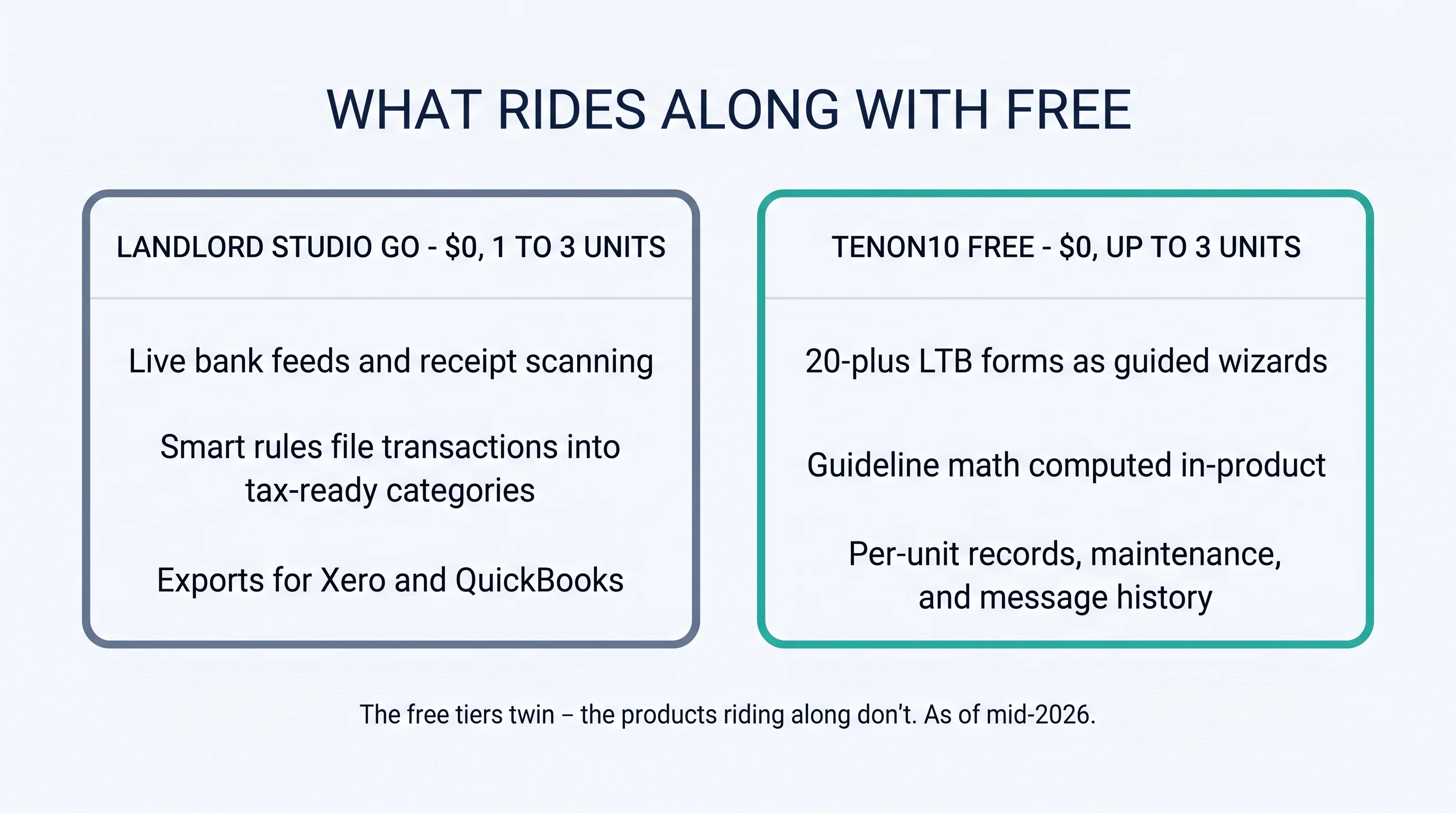
The twins, named precisely: their GO tier is for "new landlords managing 1–3 units" at $0; our Free tier covers up to 3 at $0, no clock on either side. Two vendors independently concluded that the smallest landlord deserves a real product for nothing — good news for starters everywhere, and a tie that hands the decision to what rides along.
The twinning is itself a signal worth a sentence: when two vendors on two continents independently make the 1-to-3-unit tier free, it means the category has learned that the smallest landlord isn't a lead to be converted — they're a user to be served, who upgrades when the portfolio does. Whatever you choose on this page, you're choosing between two products that got that right.
The books-or-forms fit test
1. What leads your admin? Pull your last month of rental tasks honestly. Mostly categorizing transactions, chasing receipts, prepping statements? Books-led — their territory. Mostly notices, lease events, tenant threads? Forms-led — ours.
2. Whose jurisdictions are named in the product? Section four's question, and the quietest clue in this category: their tax rails speak US and UK; our compliance rails speak Ontario deepest, with CAD-native records Canada-wide.
3. Past the twins, which ladder? Their per-unit continuation versus our brackets — section five runs the numbers in both currencies.
For landlords: Most landlords are both books-led and forms-led — in a ratio. The tell is which task you defer. If receipts pile up while notices go out on time, you're forms-led with a books problem, and their stack solves exactly what you postpone — a real argument for them. If the books are immaculate but the N1 waits until the weekend, you're books-led with a forms problem, and the wizard side is your fix. Choose the tool that handles what you postpone.
What rides along with free
Their stack first, printed with the respect it's earned — this is the deepest DIY bookkeeping at this tier. Live bank feeds mean transactions arrive without typing. Receipt scanning means the shoebox becomes searchable records. Smart rules mean the filing happens while you sleep — every expense sorted into tax-ready categories. The exports mean your accountant, your partner, or your banker opens a clean P&L instead of a shared spreadsheet with seven tabs. For the investor whose month ends in a spreadsheet and whose year ends at a refinance meeting, this stack is genuinely the point — and role-based access means the accountant sees the books without seeing everything else.
Ours, same standard: the compliance engine — 20-plus LTB forms as wizards, the guideline computed at 2.1% for 2026 and 1.9% for 2027 per our rent-increase guides, deposit and NSF rules encoded — plus per-unit records, maintenance trail, and message history: the paper trail assembled as it happens, not reconstructed when a dispute asks. And our books side, stated in accountant-language and no further: clean, CAD-native records your accountant works from. We don't claim bank feeds or receipt scanning, and this page won't pretend otherwise — their accounting depth is their win, plainly.

Reviewer texture, both halves, because both describe your future: an iPad-era support story where a reported issue was fixed in the App Store by the next day; wishes for tenant messaging and mass notifications; and bank feeds described as "confusing initially" — depth has a learning curve, fairly noted, with support-delay reports at peak periods alongside the praise.
The jurisdiction tell
Now the quietest clue in the category. Landlord Studio's tax automation sorts transactions into Schedule E or Making Tax Digital codes — the categories of the US IRS and the UK's HMRC — and its live chat runs in US and UK business hours. That's a dual-market vendor naming its two home jurisdictions inside the product itself. The observation, once and cleanly: Canadian landlords should notice which jurisdictions get named — and which doesn't.
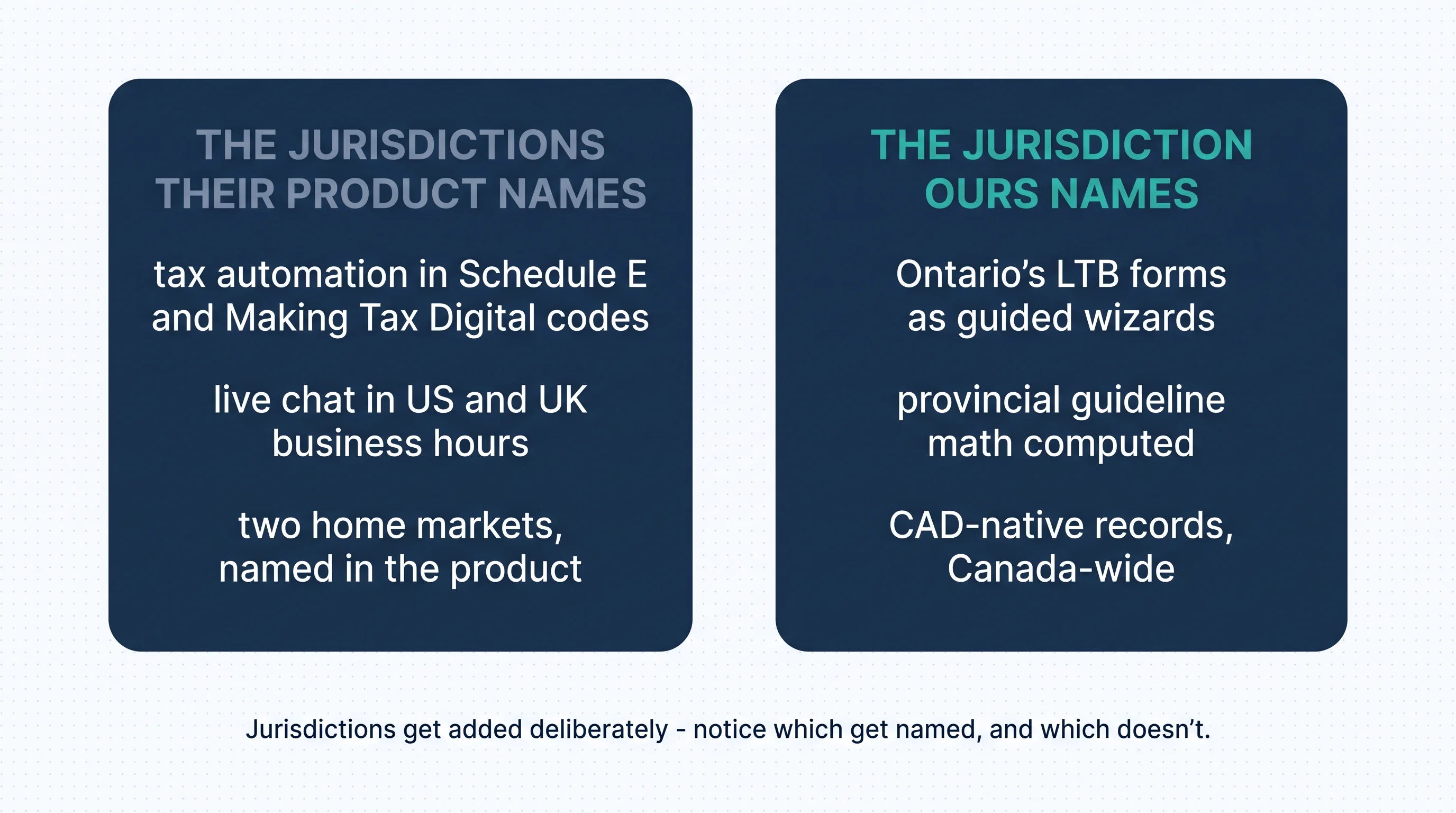
Read it fairly, because it deserves fair reading: supporting two jurisdictions' tax codes is an engineering commitment, not a default — Schedule E and MTD each represent deliberate, maintained work. That's exactly why the absence is informative without being an insult: jurisdictions get added on purpose, and Canada hasn't been. Practically, for a Canadian filer, it means the automation's categories aren't your categories — your accountant works from the exports, not from the labels. And the parallel writes itself: the same specificity logic runs our forms side, provincial and Ontario-deep — the insight our TenantCloud comparison found in state-specific forms, appearing here in tax codes.
One practical translation for the books-led Canadian who chooses them anyway — a legitimate choice this page respects: build your workflow around the exports from day one. Let the feeds and rules do the gathering and sorting, then hand your accountant the clean P&L and transaction detail rather than the in-app category labels, and let them map it to your Canadian filing. The stack still saves you hours; it just saves them upstream of the jurisdiction line rather than across it.
Past the twins: the ladders
Their ladder (all USD, as reported mid-2026 — sources drift by billing term): entry paid pricing appears at $12/month billed annually — covering the first 4 units, then about $1.00 per additional unit — or at $15 to $18 monthly depending on source and term, with a Pro Plus tier around $35. The detailed breakdown's worked example lands a 10-unit portfolio near $18/month, and their pricing page's unit slider gives the current figure for your exact count — use that number. One fee note from the same analysis: online rent collection carries transaction fees that tenants may pay; check the current schedule before your tenants meet it.
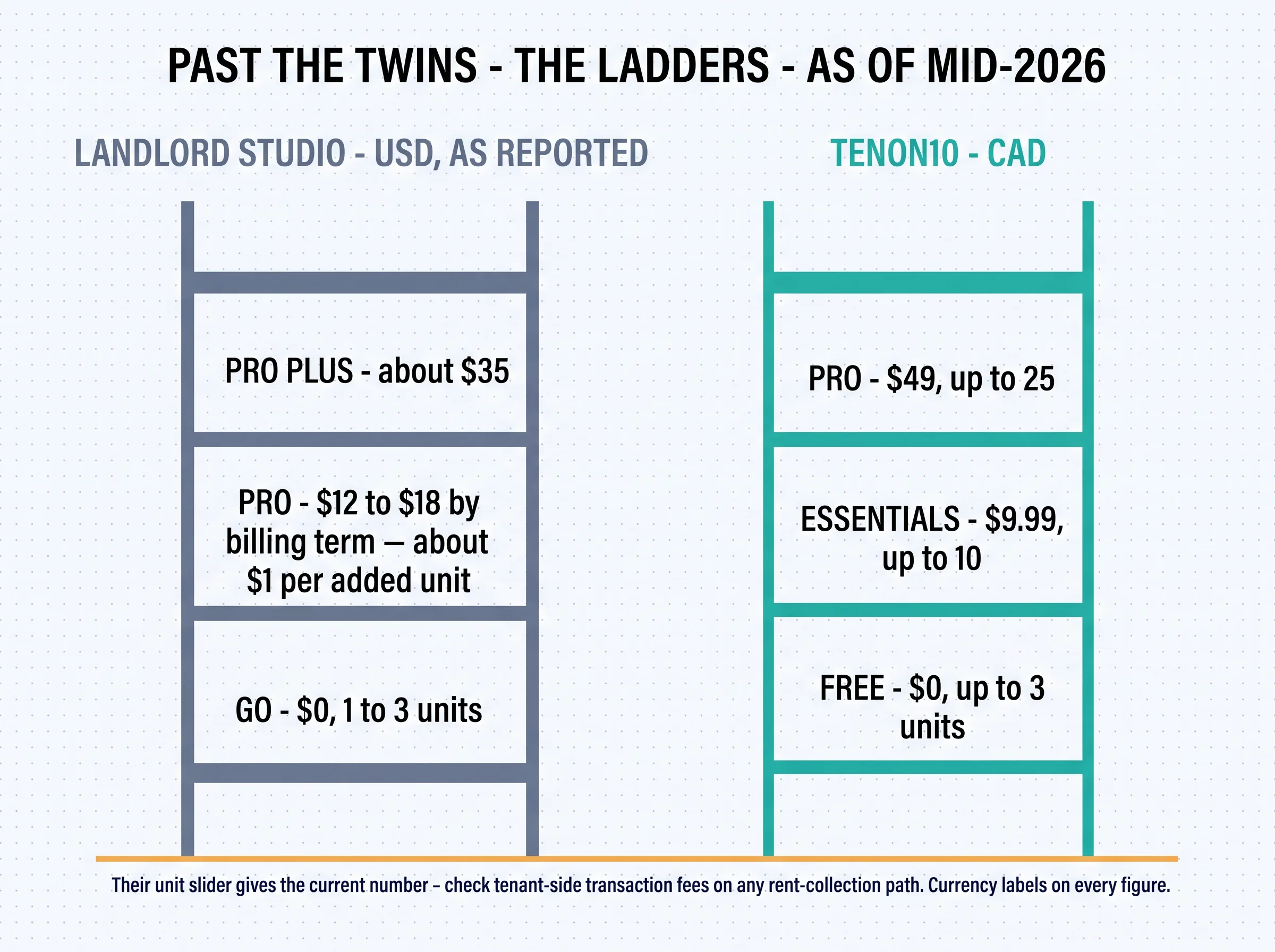
Ours (all CAD, brackets, published): Free $0 for up to 3 units, Essentials $9.99 for up to 10, Pro $49 for up to 25 — tenants free for everything, no fee layer, no meters. The structural note in one line: per-unit continuation there, bracket steps here — both cheap, differently shaped; and growers past 25 know our answer by now: the cap ends us, their slider continues, plainly.
And the block's standing currency note, once: those ladders are in different currencies — $12–$18 USD lands higher in CAD terms at whatever the exchange rate adds, every month. At these prices the absolute gap is small; the labelling habit isn't. Compare in one currency, always, even when — especially when — the numbers look close enough not to bother.
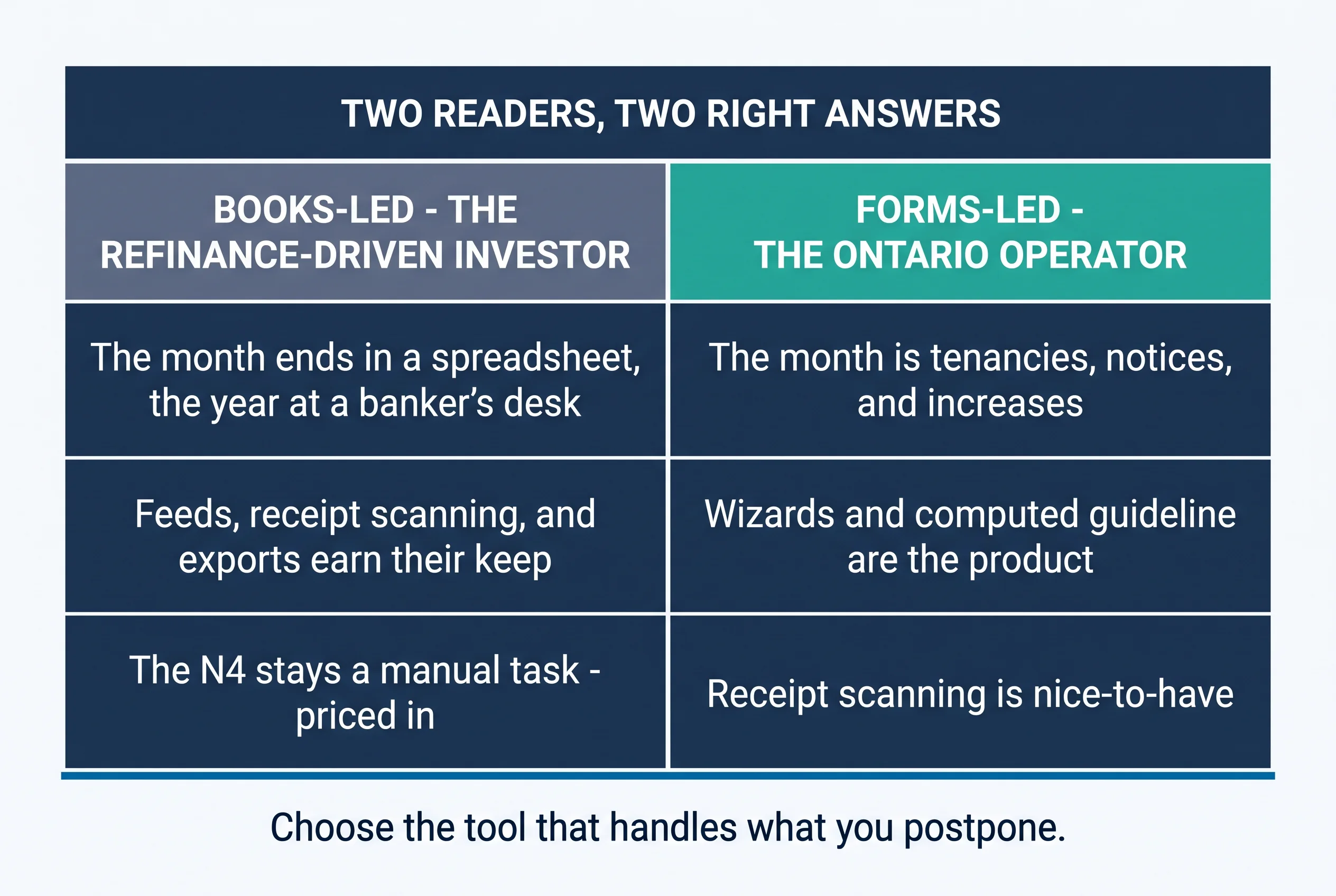
The worked pair, both verdicts straight: the books-led 8-unit investor running a refinance-driven strategy — the clean exports and receipt discipline serve the banker meetings, and that's genuinely Landlord Studio's territory; the N4 stays a manual task there, priced in with open eyes. The forms-led 12-unit Ontario operator — the notice calendar dominates the year, the wizards and computed guideline decide it, and receipt scanning is a nice-to-have. Same unit range, different leads, different right answers.
For property managers: Small-PM books run deeper than small-landlord books — owner statements, partner reporting, accountant access — and their role-based access is a genuine fit for books-heavy micro-PMs. Forms-heavy Ontario PMs under 25 doors are ours: the notice volume at management scale is exactly what the wizards were built to absorb. The honest split, one more time: choose by what your firm postpones.
Run both — and how to switch
The cheapest run-both in this series: two real free tiers means no trials, no clocks, no cards — at starter scale, this comparison costs nothing to run empirically. One unit in each, the same week, and a fourth task joins the usual three: perform each tool's signature move. Photograph one receipt into their scanner and watch it become a record; draft one N1 in our wizard and watch the guideline compute. Ten minutes each, and you'll know which one just handled the task you usually postpone.
The signature moves aren't arbitrary picks — each is the task its vendor decided mattered enough to engineer away entirely. Their receipt scanner exists because chasing paper is where books-led admin dies; our N1 wizard exists because guideline season is where forms-led admin does. Watching both work on your own unit is watching two product philosophies answer your actual life, which is more information than any comparison table — including the ones above — can carry.
Switching in either direction: the checklist above carries the sequence, with one Landlord-Studio-specific note: the bank-feed history and receipt images are the asset their stack accumulates — confirm the export formats for both before relying on the parallel month, because transaction data with its attachments is the thing you can't rebuild from memory.
The year ahead, one beat: accounting-first tools will keep deepening tax automation for their named markets, compliance-first tools will keep deepening their provincial engines — and the free-tier twins keep the start costless either way, which is the category maturing in the right direction.
Forms-led? Your side is free from unit one: the N1 as a wizard, the guideline computed, the paper trail assembling itself — up to 3 units, no card, no clock. Create a free account or see current plans.
The Switcher's Checklist: Moving Your Canadian Rentals to New Software
The 18-point sequence for changing property management software without losing a record, a payment, or a rent cycle — the fit test to run before any demo, the exports to secure before you cancel anything, the parallel month that catches every mapping error, and the clean cutover that keeps CRA-ready archives. Works whichever platform you're leaving and whichever you're joining.
Get Free PDF →Key takeaways
- The free tiers twin — 1–3 units at $0, no clocks on either side — so the decision is entirely about what rides along.
- Books-led → their territory: the deepest DIY bookkeeping at this tier — feeds, receipt scanning, smart rules, clean exports for the banker meeting.
- Forms-led → ours: 20-plus LTB wizards, the guideline computed, deposit rules encoded, and the paper trail assembled as it happens.
- The jurisdiction tell: their tax automation speaks Schedule E and Making Tax Digital — the US and UK named in-product; notice which jurisdictions get named, and confirm with your accountant how any tool's categories map to your Canadian filing.
- Past the twins: $12–$18 USD entry with per-unit continuation there (the slider decides), CAD brackets here — and check tenant-side transaction fees on any rent-collection path.
- Run both free this week and perform each signature move — photograph a receipt there, draft an N1 here. Choose the tool that handles what you postpone.
Books or forms — free either way
That's the twins' comparison, and it ends with the reader rather than the vendors — because both products made the same generous opening move and then bet on different answers to what a small landlord's admin really is. Landlord Studio bet on the books, and built the best DIY version of them at this tier: feeds, scans, rules, and exports that make refinance season civilized. Tenon10 bet on the forms, and built the compliance engine: Ontario's notices as wizards, the guideline as arithmetic the software does, the paper trail as a by-product of ordinary use. Both bets were right — for different landlords. Pull last month's task list, find what you postponed, and pick the tool that would have done it for you. The start is free either way; the fit is the only thing being decided.
The forms side, free from unit one
Ontario's LTB forms as guided wizards, the guideline computed, deposit rules encoded, and the paper trail that assembles itself — $0 for up to 3 units, no card, no clock, tenants free forever.
Free for up to 3 units • Tenants always free • See current plans
Related resources
- Property Management Software: What to Look For — the full-market evaluation framework.
- Tenon10 vs TenantCloud — where the specificity insight first appeared, in state forms.
- Tenon10 vs Rentec Direct — the twin brackets, one bracket up.
- How to Use the N4 Notice in Ontario — the wizard side's signature form, explained.
Frequently asked questions
Does Landlord Studio have a free plan?
Yes — genuinely: the GO tier covers landlords managing 1–3 units at $0 per their pricing page, making this one of the rare comparisons where both products offer a real free tier rather than a trial. Tenon10's Free tier covers up to 3 units at $0, with tenants free on every tier.
Is Landlord Studio good for Canadian landlords?
Its bookkeeping stack — bank feeds, receipt scanning, smart rules, clean exports — is the deepest DIY accounting at this end of the market, and that's real value anywhere. The scoping facts for Canadians: its tax automation sorts into Schedule E and Making Tax Digital categories (the US and UK's tax codes), support hours run US and UK, and Canadian provincial compliance tooling isn't part of the product — your accountant works from exports, and your notices stay manual.
How much does Landlord Studio cost after the free tier?
As of mid-2026, entry paid pricing is reported between $12 USD/month (billed annually, first 4 units, then about $1 per additional unit) and $15–$18 monthly depending on source and billing term, with a Pro Plus tier around $35. Their pricing page's unit slider gives the current figure for your exact count — and check the transaction-fee schedule on online rent collection, which tenants may pay.
Which is better for an Ontario landlord?
It depends on what leads your admin. If your month is transactions, receipts, and statements, their stack earns its keep — and your N4 stays a manual task, priced in. If your month is tenancies, notices, and increases, Tenon10's wizards and computed guideline are the product. Most landlords are both, in a ratio — choose the tool that handles what you postpone.
Can I try both before deciding?
Yes, at zero cost — both free tiers are real products at 1–3 units. Run one unit in each for a week and perform each tool's signature move: photograph a receipt into their scanner, and draft an N1 in our wizard. The one that removes your postponed task is your answer.


