

On North American rental platforms, roughly 70% of prospects now say they'd rather tour a unit alone, and listings offering self-showings draw about a third more visitors. The technology plainly works. What the vendor brochures never mention: in Ontario, whether any of it is legal depends entirely on one question — is someone still living there?
Showing tech is legal-status-dependent. The same lockbox that's best practice on a vacant unit is a T2 application waiting to happen on an occupied one. The virtual tour that costs nothing on an empty unit becomes a privacy claim the moment it publishes a tenant's living room. This guide maps the collision zone the proptech blogs and the legal blogs each cover only half of: the entry rules every showing must clear — including the reasonable-efforts exception most landlords misunderstand in both directions — the tech sorted by legal status, the privacy lines protecting sitting tenants and prospects alike, and the fraud perimeter that self-showings opened. Whether you're the one scheduling the showings or the one living through them, the same map applies. General information, not legal advice.
The Showing Playbooks: Online Showings & Self-Showings in Ontario — the Entry Rules, the Occupied/Vacant Split, and the Fraud Sweeps
Showing tech inherits the unit's legal status — the lockbox that fills a vacant unit fast is a T2 waiting to happen on an occupied one. This free kit gives Ontario landlords both playbooks: the 24-hour notice rules and the reasonable-efforts exception (in both directions), the occupied-unit protocol with zero lockboxes, the vacant-unit self-showing stack with one-time codes and the insurer call, and the privacy and fraud lines that protect sitting tenants and prospects alike. Two printable pages that switch with the unit's status.
Get Free PDF →The Entry Rules Every Showing Must Clear
Start with the baseline, because every showing method inherits it. Under the RTA, entering an occupied unit requires 24 hours' written notice stating the reason, the specific date, and a time window between 8 a.m. and 8 p.m. And it's one notice per entry — a Monday notice covering "showings this week" is not notice at all. Each showing gets its own document with its own date and time. (The full entry-rule map lives in our 24-hour notice of entry guide.) The one-notice-per-week mistake plays out constantly: a landlord sends a single blanket notice for five evenings of showings, the tenant files a T2 for the Thursday entry, and a $53 filing dissolves months of goodwill over paperwork that takes two minutes to do right.
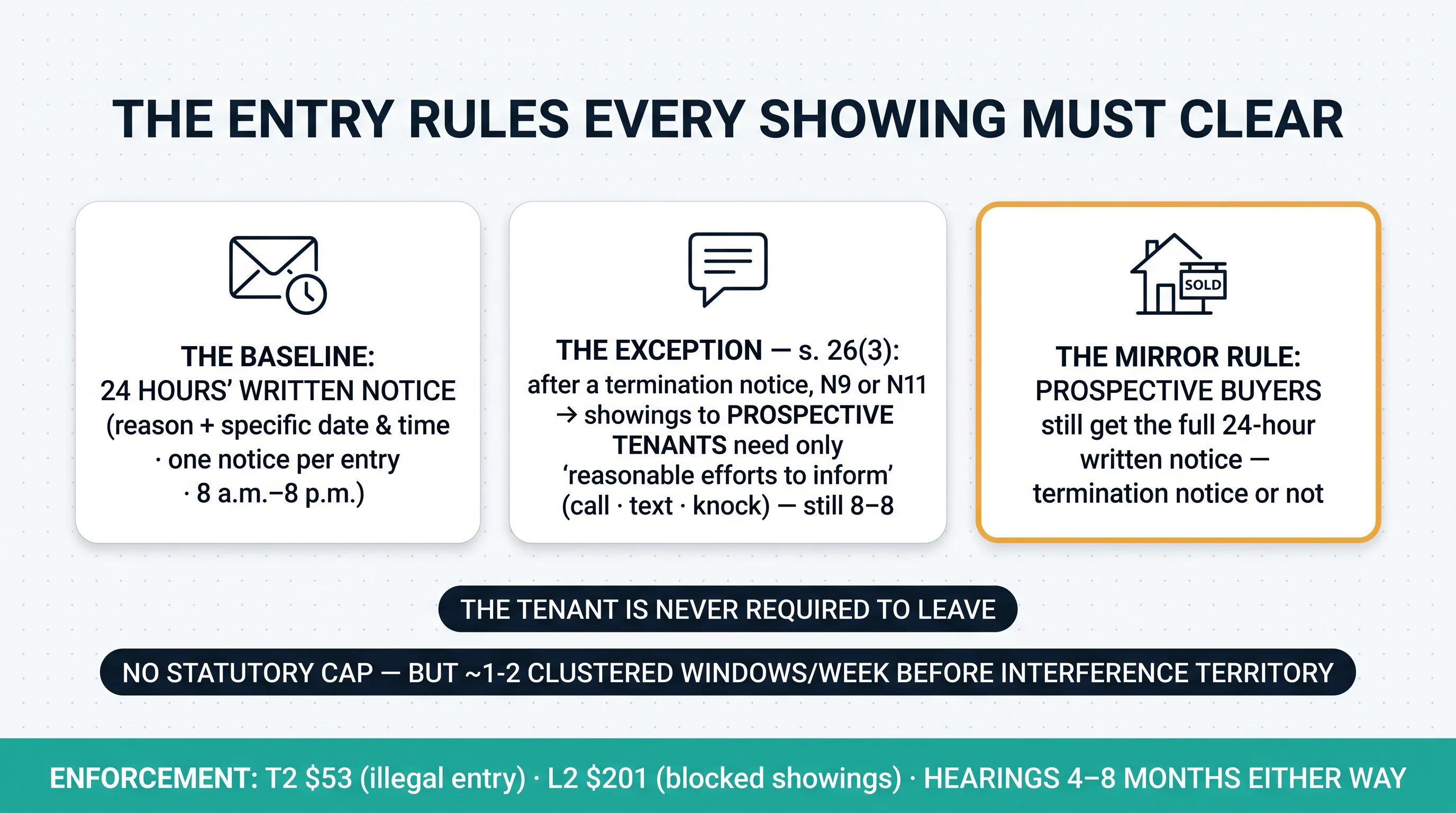
Now the exception most people get wrong — in both directions. Once a termination milestone exists — the tenant has served an N9, the landlord has served a termination notice, or both sides have signed an N11 — section 26(3) lets the landlord show the unit to prospective tenants with only "reasonable efforts to inform": a call, a text, a knock shortly before, still inside the 8-to-8 window, no 24-hour letter required. In practice even a few minutes' heads-up can qualify. Picture the 10-minute text that was legal: tenant served an N9, unit listed; the agent texts "showing a prospective tenant in 20 minutes" at 6:30 p.m.; the tenant objects — but every element of the exception is satisfied. Here's the mirror rule, though: the carve-out is tenant-showings only. Entry to show the unit to prospective buyers generally still requires the full 24-hour written notice, termination notice or not. That same 6:30 text for a buyer showing would have been an illegal entry. (Termination milestones themselves — the N9, the N11, and the rest — are mapped in our guide to ending a tenancy without eviction.)
Three constants hold no matter what: the tenant is never required to leave during any showing — they can remain through every one, though they can't actively interfere; there's no statutory cap on showing frequency, but reasonable enjoyment holds the practical line at one or two clustered windows a week before substantial interference territory begins; and the enforcement economics cut both ways — the tenant's T2 costs $53, the landlord's L2 for blocked showings costs $201, and either one waits 4–8 months for a hearing. Nobody wins on timelines, which is exactly why following the rules beats litigating them.
The Tech Map — Sorted by Legal Status
Virtual tours and video walkthroughs are the tenant-friendliest tech in the stack. On a vacant unit they're frictionless: film once, publish, reuse for years. On an occupied unit, two rules attach. First, the filming session itself is an entry — it needs the 24-hour written notice like any other. Second, the recording captures someone's home: publishing a tenant's belongings to a public listing without consent creates genuine privacy exposure. The protocol: written consent before filming or publishing, personal items staged out or blurred, and the tour taken down when the listing closes. The golden rule is simpler still — film during vacancy and reuse. And here's the under-praised win: video pre-screening kills most wasted in-person showings before they're booked. Fewer showings means fewer entries, fewer notices, and a calmer tenancy — this is the one showing technology that reduces entry-law friction rather than testing it.
Self-showings are vacant-unit tech, full stop. The model: scheduling software paired with a smart lockbox or smart lock; the prospect verifies government ID (often with a facial-recognition match), receives a one-time access code, tours alone, and the access is logged. The performance case — all North American platform data — is real: about 70% of prospects prefer touring alone, self-showing listings draw roughly 31% more visitors, about half of single-family property managers now offer them, and platform case data shows days-to-lease cut roughly in half. The practical craft matters too: one-time codes only, never static; reliability varies sharply by lock type on vacant units without internet; and the platform folklore includes the $12 set of dead lock batteries that cost one landlord four qualified prospects in a single Saturday. But the bright line is absolute, and even the self-showing platforms state it themselves: never on an occupied unit. An unaccompanied stranger entering with a code is an entry the landlord authorized without notice or supervision — a T2 for illegal entry, a privacy breach of the sitting tenant's home, and a liability magnet all at once. The lockbox on the occupied condo is a recurring disaster: an out-of-town owner mounts one "to make showings efficient," a prospect walks in on the tenant, and the file now includes an illegal-entry claim with a harassment complaint riding beside it.
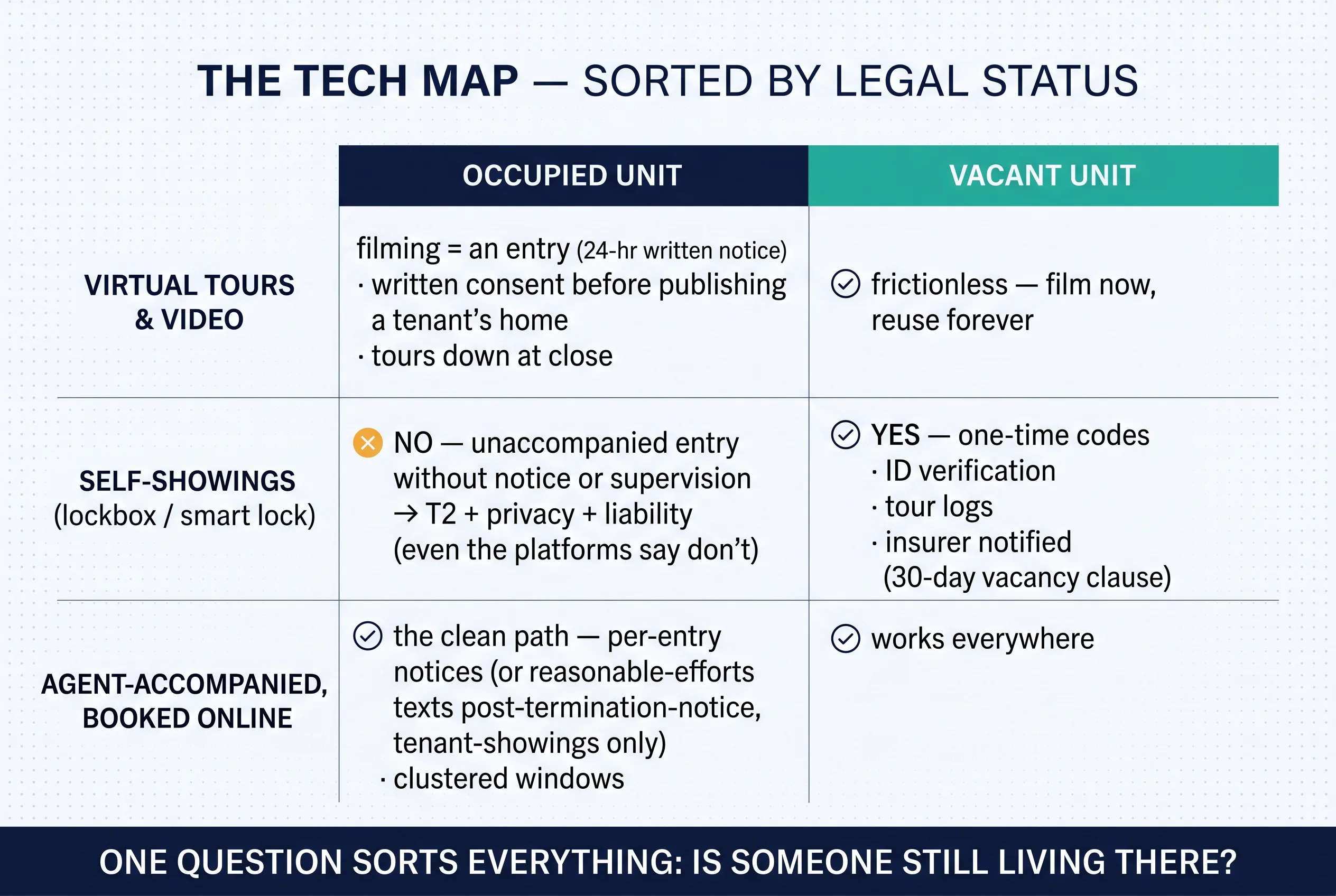
And the hybrid that survives every status: agent-accompanied showings booked online. All the scheduling convenience, none of the legal exposure — on occupied units it remains the clean path: per-entry notices (or reasonable-efforts texts post-termination-notice, tenant-showings only), clustered windows, and a human at the door.
The Privacy Lines and the Fraud Perimeter
The privacy lines run in both directions, and the first direction protects the person already living there. The sitting tenant's floor, stated plainly: proper notice for every entry, the right to remain through every showing, the right against excessive showings, and the T2 as the remedy when the lines are crossed. The filming line belongs here too — the unit is yours; the tenant's home in the frame is not. Consent or vacancy first. (Tenants: this sits alongside the rest of your baseline rights.)
The second direction protects the prospect. Self-showing verification stacks collect government ID, facial-recognition scans, and geolocation — sensitive personal information by any standard. Canadian privacy norms expect consent, minimal collection, and retention limits; a landlord choosing a platform should ask two questions before signing: where does the ID data live, and when is it deleted? Smart-lock entry logs deserve a mention here too, because they cut both ways — the same log that documents a landlord's compliance also documents any entry that shouldn't have happened. Codes rotate at every turnover, without exception.
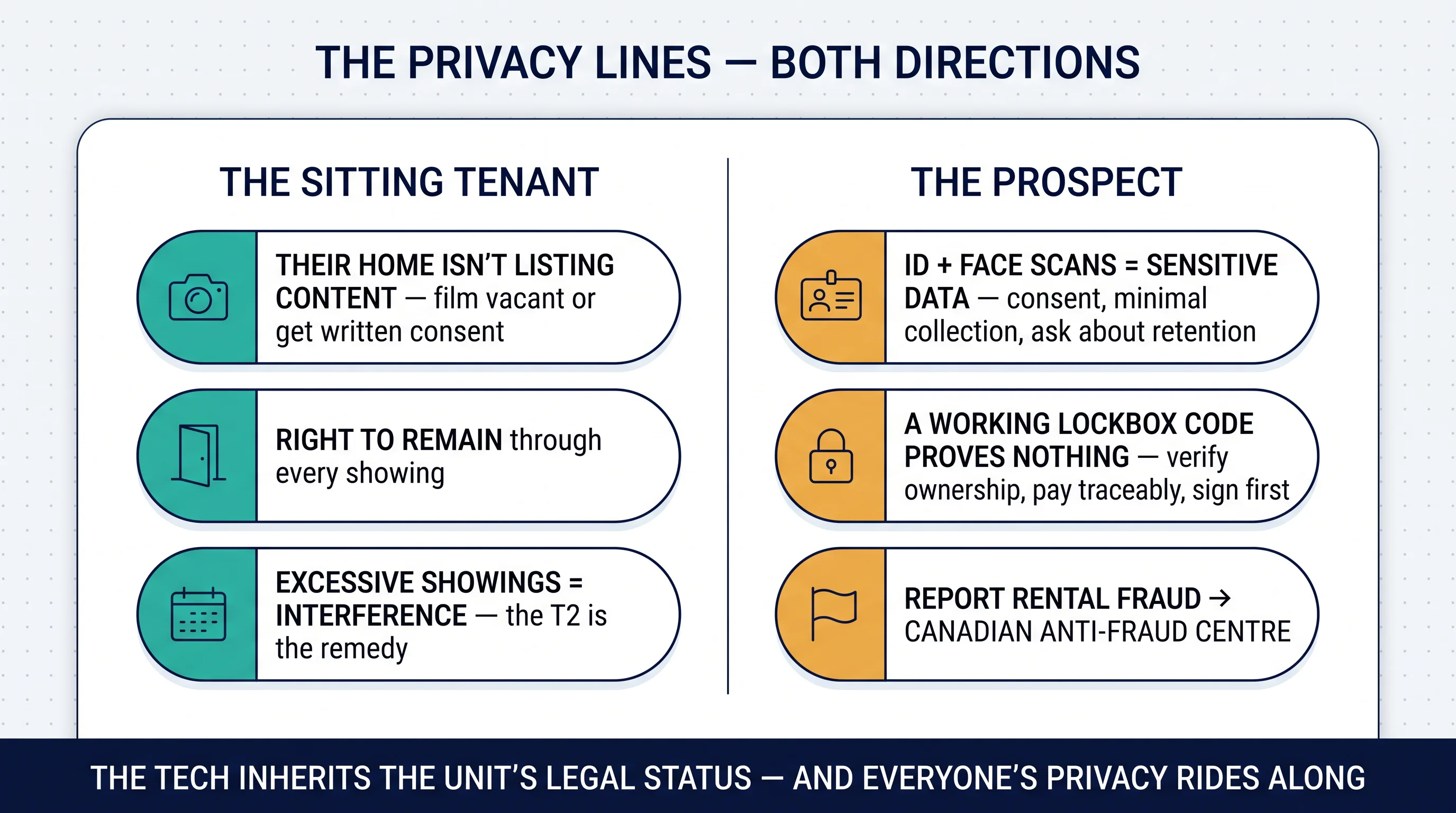
Then there's the perimeter self-showings opened: the fraud wave. The pattern is elegant and ugly — scammers copy listings from self-tour services, pose as the landlord, and hand out real one-time codes to real vacant homes. The prospect tours a property that exists, opens a lockbox that works, and wires a deposit to someone who owns nothing. The tour itself no longer proves legitimacy. The scale is serious: US regulators logged $65 million in reported rental-scam losses in the latest data, with renters aged 18–29 three times more likely to lose money than other adults; in Canada, reports run through the Canadian Anti-Fraud Centre. The cloned listing plays out like this: a scammer copies a self-showing ad, collects two "deposits" from prospects who toured the genuine vacant unit with genuine codes — and the landlord finds out only when the victims arrive on move-in day. The fixes, both sides: landlords run one-time rotating codes, sweep the major listing sites weekly for clones of their own ads, post a verification card inside the unit ("you booked through this channel — if you paid anyone else, stop"), and pull listings the day they lease. Prospects verify ownership independently, never pay a cent before a signed lease, and use traceable payment only — a normal background check costs $25–$45, and anything wildly above that is its own red flag. (Once the tour leads somewhere real, legitimate screening starts after the application, not before the viewing.)
Where Showing Tech Is Heading — and the Two Playbooks

The direction of travel is clear: self-showing adoption keeps climbing (the smart-lock market is on track to roughly triple this decade), AI-generated listing fraud is rising in parallel, and platform ID stacks will get heavier — with privacy scrutiny following close behind. What isn't changing is Ontario's entry law: the September 21 wave of rental-law changes touches notices and applications, not the entry rules — so the compliance layer stays stable even as the tools churn. Which makes the playbooks durable:
The occupied-unit playbook: video pre-screening first; clustered, agent-accompanied windows (one or two a week); per-entry written notices — or reasonable-efforts texts once a termination notice exists, tenant-showings only; the sitting tenant consulted on scheduling; and zero lockboxes, ever. The vacant-unit playbook: the full self-showing stack with one-time codes and ID verification; the insurer notified the day the unit empties; tour logs kept; fraud sweeps weekly; and the listing down — codes killed, tour unpublished — the day it leases.
Practical Takeaways
- Sort every showing plan by one question first: occupied or vacant. The method follows the answer.
- Occupied units: one written notice per entry, 8 a.m.–8 p.m., clustered windows — "showings this week" is not notice.
- Post-termination-notice: reasonable-efforts texts work for tenant-showings only — buyers still get the 24-hour letter.
- Never publish a tenant's belongings: film vacant or with written consent; tours down when the listing closes.
- Self-showings on vacant units only: one-time codes, ID verification, tour logs — and the insurer notified.
- Run fraud sweeps: watch for clones of your own listing; keep a verification card inside the unit.
- Prospects — a working code proves nothing: verify ownership, sign before paying, traceable payment only.
The Showing Playbooks: Online Showings & Self-Showings in Ontario — the Entry Rules, the Occupied/Vacant Split, and the Fraud Sweeps
Showing tech inherits the unit's legal status — the lockbox that fills a vacant unit fast is a T2 waiting to happen on an occupied one. This free kit gives Ontario landlords both playbooks: the 24-hour notice rules and the reasonable-efforts exception (in both directions), the occupied-unit protocol with zero lockboxes, the vacant-unit self-showing stack with one-time codes and the insurer call, and the privacy and fraud lines that protect sitting tenants and prospects alike. Two printable pages that switch with the unit's status.
Get Free PDF →The Bottom Line
Showing technology is genuinely good at its job: vacancies fill faster, prospects tour on their own schedule, and video kills the wasted appointment. But in Ontario, every tool inherits the unit's legal status. Vacant units can run the whole stack — codes, ID checks, unaccompanied tours. Occupied units get notices, clustered windows, and a human at the door, because someone's home is on the other side of it. The privacy lines run in both directions — the sitting tenant's living room isn't listing content, and the prospect's ID isn't a free-for-all — and the fraud wave means the tour itself has stopped proving anything about who's collecting the money. Landlords who sort by status first get all of the speed with none of the T2. Tenants who know the floor can welcome the technology without surrendering the home. General information, not legal advice — and the hearing-wait and fee figures on this page deserve a fresh check on publish day.
Fast Showings. Clean Paper. No T2s.
The entry notices, the service records, the termination paperwork the exceptions hang on — Tenon10 keeps the whole showing season compliant while the tech does its job.
Free • No signup required • Updated for the Bill 60 changes in force 21 Sep 2026
Related Resources
- The 24-Hour Notice of Entry Rule in Ontario — the anchor rule every showing inherits
- Removing a Tenant Without Eviction — where the termination milestones behind the reasonable-efforts exception come from
- Landlord Insurance in Ontario — the 30-day vacancy clause every self-showing program triggers
- The Substantial Interference Standard — where excessive showings cross the line
- Income Verification for Self-Employed Tenants · 5 Things Your Landlord Can't Do in Ontario
- Property Management Software in Ontario — where the scheduling and logging stack lives
- Ontario LTB Forms Hub · Certificate of Service
Frequently Asked Questions
Can a landlord use a lockbox for showings in Ontario?
On a vacant unit, yes — lockbox and smart-lock self-showings are legal and increasingly common, best run with one-time codes, ID verification, and access logs. On an occupied unit, no — in practice a lockbox lets strangers enter without the required notice or supervision, which violates the tenant's entry rights (a T2 application) and creates serious privacy and liability exposure. Even self-showing platforms advise against it. If someone still lives there, showings should be accompanied and properly noticed.
How much notice does a landlord need to give for a showing in Ontario?
For an occupied unit, generally 24 hours' written notice per entry, stating the reason and a specific date and time between 8 a.m. and 8 p.m. — one notice cannot cover a week of showings. There's one exception: once a termination notice, N9, or N11 exists, showings to prospective tenants need only "reasonable efforts to inform" (a call, text, or knock), still between 8 and 8. Showings to prospective buyers generally still require the full 24-hour written notice.
Do tenants have to leave during showings in Ontario?
No — never. A tenant has the right to remain in their home during any showing, whether to prospective tenants or buyers, and cannot be required or pressured to leave. They also can't actively interfere with a lawful showing. Most tenants step out for practical reasons, but it's a choice, not an obligation.
Can a landlord film a virtual tour of an occupied unit?
The filming session itself is an entry requiring proper notice, and publishing footage of a tenant's home and belongings without consent creates real privacy exposure. Best practice is to film while the unit is vacant and reuse that footage, or get the tenant's written consent, stage or blur personal items, and take the tour down when the listing closes.
Are self-guided rental tours safe from scams?
The technology is only as safe as the verification around it. Scammers copy self-showing listings, pose as the landlord, and send prospects real codes to real vacant units — so a working lockbox code proves nothing about who's collecting the money. Prospects should verify ownership independently, never pay anything before a signed lease, and use traceable payment only. Landlords should use one-time codes, sweep listing sites for clones, and post a verification notice inside the unit. In Canada, report rental fraud to the Canadian Anti-Fraud Centre.


