

Here's something you won't read on most comparison pages: if you're a property management company running 300 doors, you should probably close this tab and go demo Buildium. It's excellent software, reviewers rate it 4.4 out of 5 on G2 (across 260 reviews, as of July 2026), and it was built for exactly your job. Still here? Then you're probably the landlord Buildium's own pricing was never aimed at — its base plans target companies managing 20 units and up, priced in US dollars — and this page is about the other tool: the one built for Canadian landlords and small property managers with one to twenty-five doors.
What follows is an honest comparison, which mostly means an accurate one: the five-minute fit test that sorts almost every reader, the true cost in the right currency, the compliance gap that never shows up on feature lists, and a clear verdict in both directions. By the end you'll know which side of the line your portfolio sits on — and if it's Buildium's side, we'll say so.
The Switcher's Checklist: Moving Your Canadian Rentals to New Software
The 18-point sequence for changing property management software without losing a record, a payment, or a rent cycle — the five-minute fit test to run before any demo, the exports to secure before you cancel anything, the parallel month that catches every mapping error, and the clean cutover that keeps CRA-ready archives. Works whichever platform you're leaving and whichever you're joining.
Get Free PDF →Two tools, two jobs
The verdict belongs at the top, in both directions.
Choose Buildium if you manage roughly 50 to 1,000 doors, run US-style professional operations, need property categories for associations, commercial, or student housing, want enterprise-grade accounting (its headline 1099 e-filing feature tells you the home market), and have a team that benefits from unlimited user seats. It has supported Canadian online payments since 2017, its reviewers genuinely like it — the ease-of-use and support praise in Canadian software directories is consistent — and Canadian roundups correctly recommend it for large portfolios. None of that is a concession; it's just true.
Choose Tenon10 if you're a Canadian landlord or small property manager with 1 to 25 units who wants software priced in Canadian dollars, built on Canadian assumptions, where tenants never pay a cent — and, if you're in Ontario, where the LTB forms are guided wizards and the rent-increase guideline math is done for you.
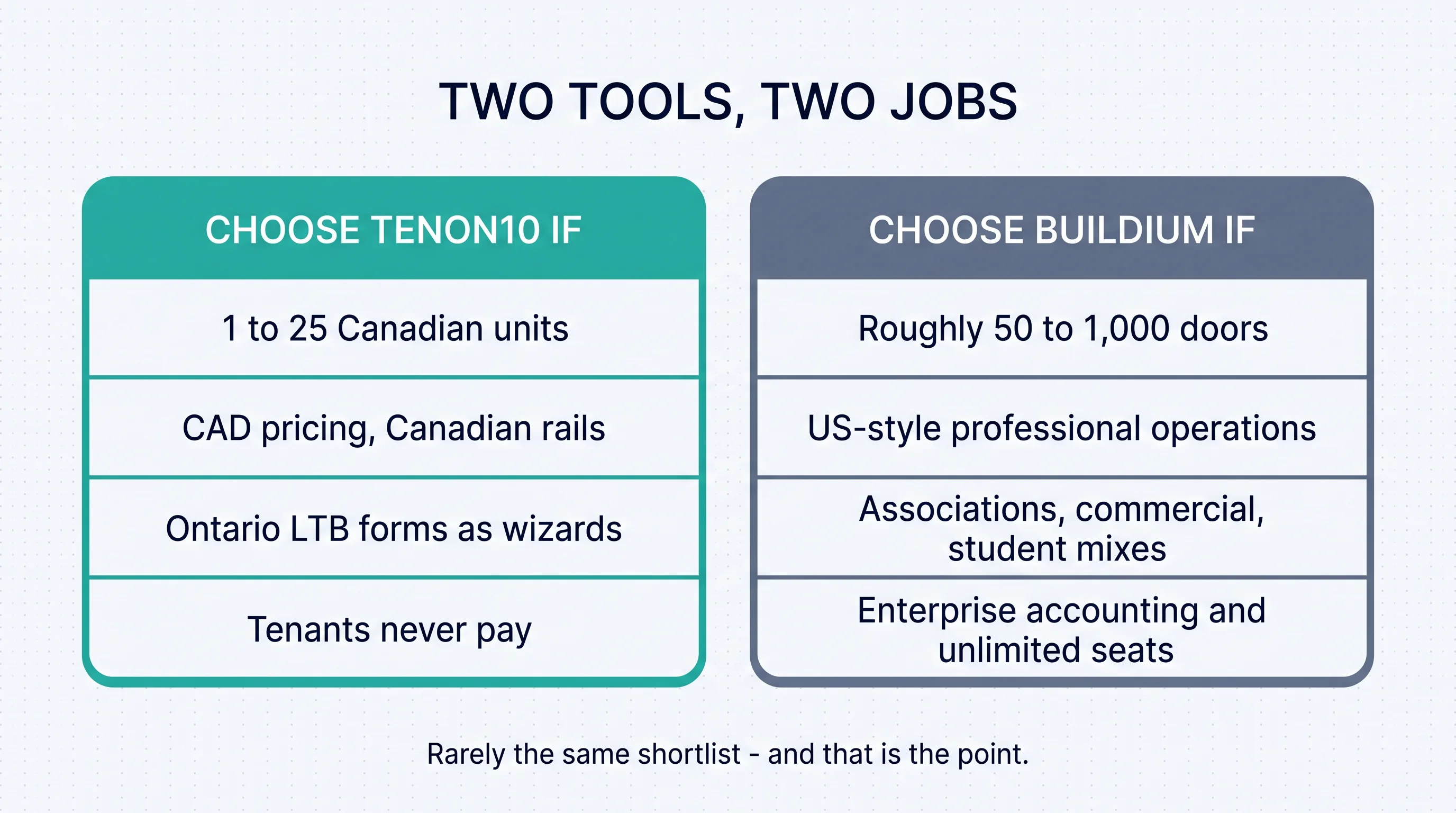
The whole comparison compresses into one sentence: these two tools should rarely appear on the same shortlist, and when they do, it's a geography accident, not a product contest. The confusion exists because most software research runs through US review sites that rank by feature count, and Canadian buyers land on USD price lists without anyone running the fit analysis. So let's run it — and a word on why we run it this way. A comparison page that pretends one tool wins everywhere isn't marketing; it's noise, and buyers can smell it. The readers this page sends to Buildium were never going to be happy on a 25-unit-capped platform, and the readers it keeps were never the buyer a 20-unit pricing floor was designed for. Sorting accurately costs us nothing and earns the one thing a comparison page actually needs: your trust in the parts where we say something favourable about ourselves.
The five-minute fit test
Five questions, in order of how much they decide.
1. Doors. Count your units. Under 25, you're in Tenon10's territory — the whole product assumes your scale. Fifty or more under professional management, you're in Buildium's — its own base pricing targets companies managing at least 20 units, and its sweet spot sits well above that. Between 25 and 50? That's a real grey zone, and it gets its own honest section below.
2. Currency and rails. If your revenue is in Canadian dollars and your operations are in Canada, USD-priced software carries a structural premium you pay every month, forever, at whatever the exchange rate happens to be. That's not a criticism of any US platform — it's arithmetic.
3. Forms. If you can name the notice forms you serve — the N4, the N1, or your province's equivalents — then the question "which platform actually knows these forms" will probably decide your choice. If your world is condo associations, commercial mixes, and student housing, that's Buildium's category system, and it's genuinely good at it.
4. Budget shape. Flat CAD tiers from $0 to $49 CAD per month on one side; $62 to $400 USD per month plus a per-transaction fee layer on the other. Which shape fits your portfolio is mostly a function of question one.
5. Who pays for tenants. On Tenon10, tenants are always free — the tenant portal is never a cost passed down. On any platform you evaluate, check the tenant-side fees and pass-throughs, because your tenants' payment experience is part of your product.
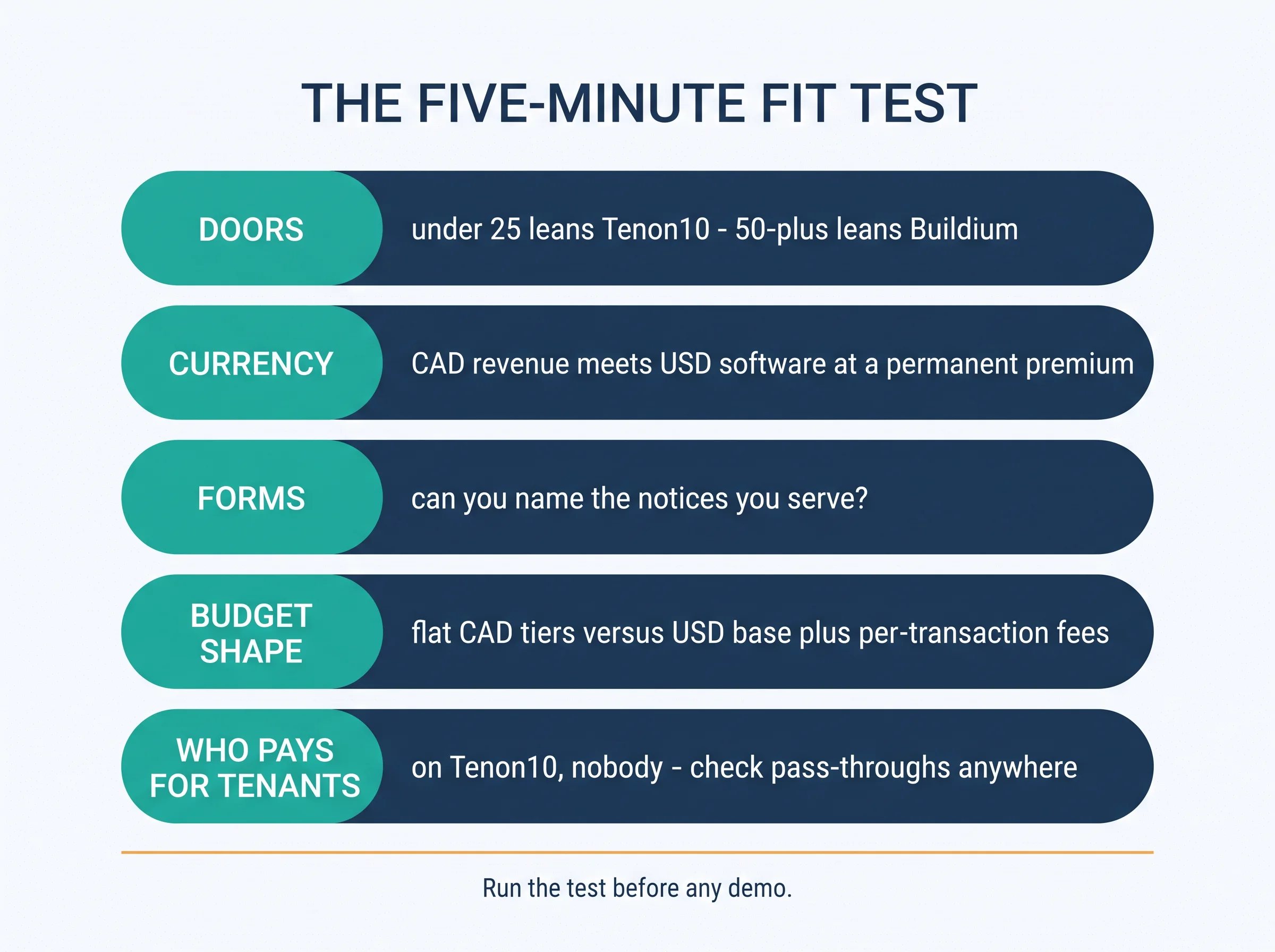
For landlords: Run the fit test before you book any demo — of anything, ours included. A demo sells you the tool's best day; the fit test tells you whether its best day is your job. Five questions sort almost every buyer before a single screen gets shared.
Price, in the right currency
Buildium's pricing (all figures USD, as of July 2026 — check their pricing page for current rates): three flat monthly tiers — Essential at $62 USD/month with a 150-unit cap, Growth at $192 USD/month, and Premium at $400 USD/month, which includes their Lumina AI Suite. Annual billing earns roughly a 10% discount, and every tier includes unlimited users, which is a real advantage for teams. For Canadian buyers, a Canadian investment publication's software roundup put the converted range at roughly $85 to $550 CAD per month at current exchange rates — adding, in their words, that it's "not cheap for a small portfolio."
Then there's the fee layer (all figures USD), which is where small-portfolio economics actually move: incoming EFT payments at $2.35, $1.35, or $0.60 per transaction depending on tier; outgoing EFT at $0.99; credit cards at 2.99%; $99 per bank-account setup; and roughly $5 per eSignature document on the Essential tier. At 300 doors those per-transaction fees are noise. At four doors, they're a meaningful share of the bill — independent reviewers modelling a 150-unit operation put realistic all-in totals at $150 to $400 USD per month depending on tier. Reviewers have also noted that prices have risen over time; evaluate on current rates, not remembered ones.
Tenon10's pricing (all figures CAD, flat, no transaction fee layer): Free at $0 for up to 3 units — and the Free tier is the product for a small landlord, not a trial; Essentials at $9.99 CAD/month for up to 10 units; Pro at $49 CAD/month for up to 25. Tenants are always free on every tier. Current details are on the pricing page.
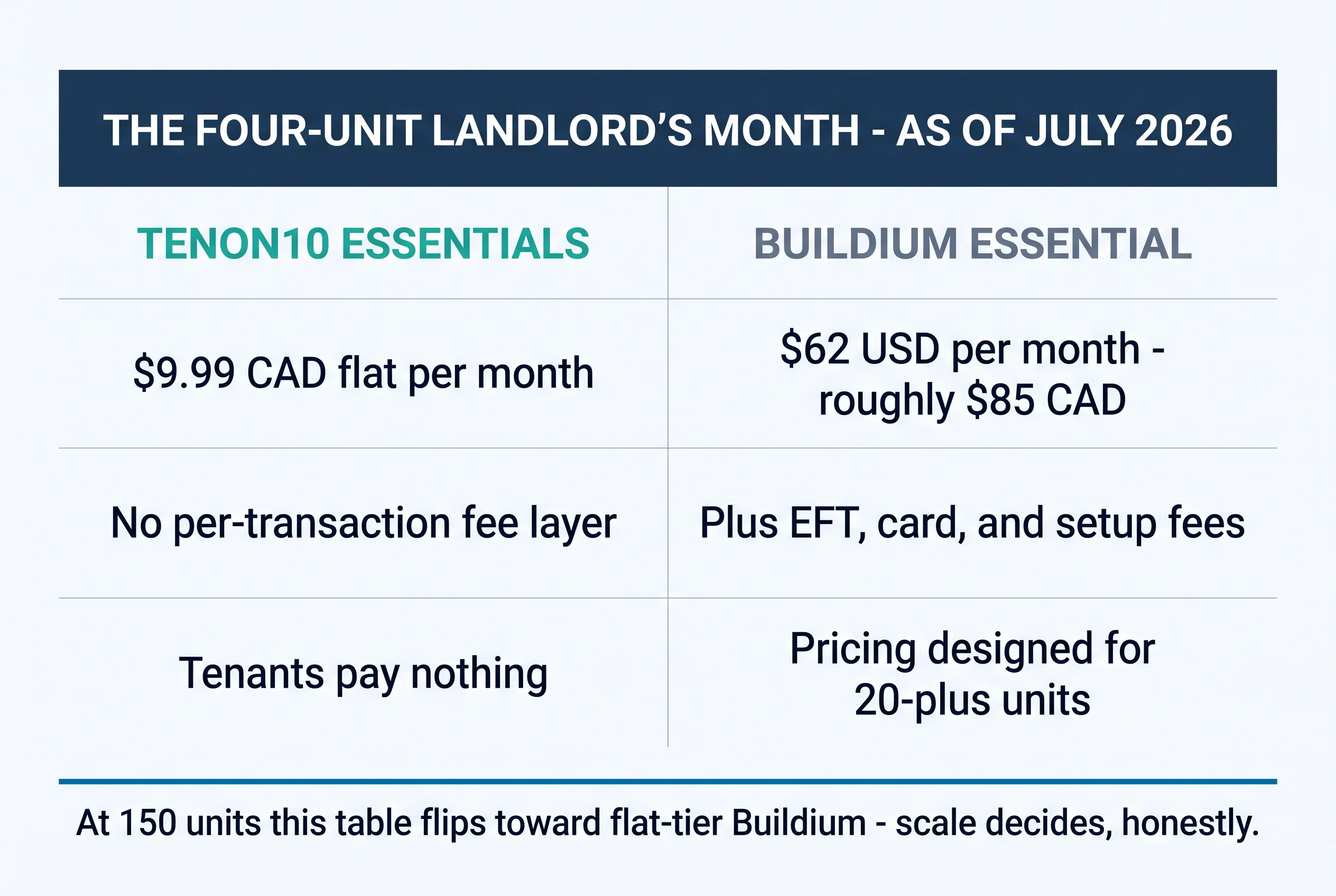
The worked example makes it concrete. A four-unit Canadian landlord pays $9.99 CAD flat on Tenon10 Essentials. The same landlord on Buildium Essential pays $62 USD — roughly $85 CAD before a single transaction fee — for software whose own pricing documentation targets companies managing at least 20 units. That's not Buildium being unreasonable; it's Buildium being honest about who it's for, and the four-unit landlord simply isn't that buyer. And the flip is just as honest: at 150 units, Buildium's flat-tier model beats per-unit pricing structures handily — a 150-door company pays the same base as a 50-door one. That's the scale the product was priced for, and at that scale it's good value.
The compliance gap
The structural feature of Canadian renting that no feature list captures: provincial regimes. Ontario has the Residential Tenancies Act with its N-series and L-series forms and guideline rent control — 2.1% for 2026 and 1.9% for 2027, per our complete 2026 N1 guide and 2027 guide. British Columbia runs different deposit rules entirely. Every province has its own forms, its own clocks, its own math. US-built software doesn't model any of this — fairly, because its home market doesn't need it. But the gap doesn't disappear just because the software doesn't mention it.

Here's what that means on an ordinary Tuesday. On generic software, an Ontario landlord's N4 is a blank PDF they fill out themselves; the guideline increase is math they do themselves; the last month's rent interest is a rule they remember themselves. On Tenon10, those are wizards and computed fields: 20+ LTB forms as guided workflows, the guideline math in-product, deposit and NSF rules encoded. To state the scope precisely: Tenon10 is built for Canadian landlords, with the deepest compliance toolkit in Ontario — the CAD pricing, Canadian rails, and per-unit record-keeping are national; the form wizards and guideline automation are Ontario's, today.
The fair framing for both products: choosing software is choosing which problems stay manual. A Kansas management company has no N4 problem, so its software doesn't either. An Ontario landlord has one whether their software admits it or not — the only question is who fills the form out.
The rails matter beyond the forms, too. Canadian rent moves on Canadian assumptions — pre-authorized debit, e-transfer culture, CAD bank accounts — and software built on those assumptions doesn't ask you to translate your operation into another country's defaults. It's a quieter advantage than a form wizard, but it's the one you feel every month: statements in your currency, payment flows your bank recognizes, and records your accountant can hand to the CRA without a conversion column.
Feature by feature, honestly
Where Buildium is strong, said plainly: mature accounting with automated bank reconciliations and e-filing in its home market; property categories that genuinely handle associations, commercial, and student housing; unlimited team seats on every tier; a full showings-and-leasing stack; an AI suite on its Premium tier; and a support reputation that Canadian software directories consistently reflect in reviews. If that list reads like your operation, you have your answer, and it isn't us.
Where Tenon10 is built differently on purpose: Canadian-first from the currency up; compliance in the workflow, deepest in Ontario; Keya, the built-in AI assistant, available on every tier rather than reserved for the top one; per-unit records, maintenance tracking, and message history scaled for the retail portfolio; and tenants free forever — the tenant portal is never a cost centre passed down the chain.
A screening note, hedged accurately: Buildium's tenant screening is built around US bureau infrastructure — credit reports and eviction-history products designed for the American market. Canadian screening runs on different rails. Whichever platform you use, verify what a Canadian applicant report actually contains before you rely on it.

On support and scale: Buildium's unlimited seats matter when you have a team — leasing agents, bookkeepers, maintenance coordinators, all in one system. A 1-to-25-unit operation is usually one or two people wearing every one of those hats, and that's the scale Tenon10's entire surface assumes: fewer dashboards, fewer settings, and the compliance details handled where a solo operator would otherwise be the only line of defence.
For property managers: Small Canadian PMs with up to 25 doors under management fit Tenon10's Pro tier as it stands. Growing firms should model the crossover honestly: chart your door count against both platforms' economics over the next three years, not just this quarter — the next section is yours.
The grey zone, and how to switch
Now the part most comparison pages skip. Tenon10's Pro tier caps at 25 units. That's the product's honest ceiling, and we won't pretend otherwise. If you're at 30 doors and climbing, Buildium's economics start working in your favour and its 20-unit design floor stops being a penalty — its flat tiers were built for exactly your trajectory. If you're at 25 and holding, the CAD math still favours staying Canadian. The deciding input isn't your current count; it's where your portfolio is going over the next two or three years.
Switching — in either direction — follows the same sequence: export everything first and open the files to confirm they're complete; map units and tenants in the new system; run one full rent cycle in parallel and reconcile to the dollar; move payment authorizations last, only after the parallel month runs clean; archive the old system's records to CRA retention standards; and cancel at cycle end, never mid-cycle. The Switcher's Checklist above carries the full 18-point sequence, and it works whichever platform you're leaving.
Looking ahead, one honest beat: the CAD/USD spread keeps the currency question live for every Canadian buyer of US software, and Canadian-first tooling keeps deepening across the market. The fit test will keep giving the same answer for the same buyer — which is exactly what a good test should do.
The cheapest way to run the fit test: run the product. Tenon10's Free tier covers up to 3 units with no card required — set up a unit in five minutes and see whether the fit is real before spending anything. Create a free account or review current plans.
The Switcher's Checklist: Moving Your Canadian Rentals to New Software
The 18-point sequence for changing property management software without losing a record, a payment, or a rent cycle — the five-minute fit test to run before any demo, the exports to secure before you cancel anything, the parallel month that catches every mapping error, and the clean cutover that keeps CRA-ready archives. Works whichever platform you're leaving and whichever you're joining.
Get Free PDF →Key takeaways
- Two good tools, two different jobs — count your doors before reading any feature list, because scale decides more than features do.
- Under 25 Canadian units → Tenon10's territory; 50+ professionally managed → Buildium's; in between, model your growth trajectory, not your current count.
- Label every price's currency and compute the true monthly cost — base plus the fee layer, per door, in one currency.
- Name your province's forms and ask which platform knows them — for Ontario landlords, that gap alone decides the question more often than any other feature.
- Tenants never pay on Tenon10; on any platform, check the tenant-side fees before your tenants find them for you.
- Confirm the export path first and switch with a parallel month — the checklist above carries the full sequence.
Choose the tool built for your side of the line
That's the whole comparison, honestly run. Buildium is excellent software for the professional, portfolio-scale, US-modelled operation — and if the fit test put you there, go with our genuine respect; you'll be well served. Tenon10 is the tool for the other side of the line: the Canadian landlord with a basement suite, a triplex, or a growing book of doors under twenty-five, who wants their software priced in their currency, built on their country's assumptions, and — in Ontario — fluent in their forms. Neither tool is trying to be the other, and that's precisely why the choice is easy once you count your doors. Whichever side you're on, choose the tool that was built for it.
Built for Canadian landlords with 1–25 doors
CAD pricing, Canadian rails, Ontario's LTB forms as guided wizards, and tenants who never pay. The Free tier covers up to 3 units — no card required, set up in minutes.
Free for up to 3 units • Tenants always free • See current plans
Related resources
- Property Management Software Ontario: What to Look For — the evaluation framework behind this comparison.
- How to Use the N4 Notice in Ontario — the form at the centre of the compliance gap.
- Ontario Rent Increases: The Complete N1 Guide — the guideline math your software should be doing.
- Becoming a Landlord in Ontario — start the system before the first tenancy.
Frequently asked questions
Does Buildium work in Canada?
Yes — Buildium has supported Canadian online payments since 2017, and Canadian firms use it, particularly at larger portfolio sizes. The considerations for Canadian buyers are USD pricing, workflows built for the US market (accounting and screening in particular), and the absence of provincial compliance features like LTB form workflows — availability isn't the issue; fit is.
How much does Buildium cost in Canadian dollars?
Buildium prices in USD: $62 to $400 per month across three tiers (as of July 2026), plus per-transaction fees for payments, cards, bank setup, and eSignatures. A Canadian software roundup estimated roughly $85 to $550 CAD per month at current exchange rates, before the fee layer. Always check Buildium's own pricing page for current figures.
Is Tenon10 free?
For up to 3 units, yes — the Free tier is the full product for a small landlord, not a time-limited trial. Essentials covers up to 10 units at $9.99 CAD per month, Pro covers up to 25 at $49 CAD per month, and tenants are always free on every tier.
Which is better for an Ontario landlord?
For portfolios up to 25 units, Tenon10 was built for exactly this case: 20+ LTB forms as guided wizards, the rent-increase guideline computed in-product, and deposit and NSF rules encoded. Larger Ontario operations that need enterprise accounting, property categories, and unlimited team seats should evaluate Buildium seriously — the forms stay manual there, but at real scale the operational features may outweigh that gap.
Can I switch from Buildium to Tenon10, or back?
Yes, in either direction: export your data first and confirm the files open, map units and tenants in the new system, run one parallel rent cycle and reconcile it fully, move payment authorizations last, and archive the old records to CRA retention standards before cancelling at cycle end. The Switcher's Checklist on this page covers the complete sequence.


